By
Emre Toptanci
on 06/08/2024, 11:09
Last updated on 9/29/26, 1:29 AM

During a typical sprint, a Jira issue rarely follows a straight path. A ticket will often bounce from "In Progress" to "Testing," fail QA, and go right back to "In Progress."
Historically, when you pulled a Status Duration report in Timepiece - Time in Status for Jira, it defaulted to showing you the total accumulated time an issue spent in that status across its entire lifecycle.
How Multi Visit Behavior Works
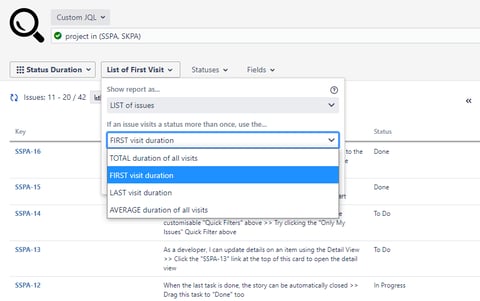
Available exclusively for Status Duration reports, Multi Visit parameter allows you to isolate individual status visits. Instead of defaulting to the total time, you can now select from four specific options:
-
Total (Default): Calculates the combined duration of all visits to a specific status.
-
First Visit: Isolates and reports only the duration of the first time the issue entered that status.
-
Last Visit: Isolates and reports only the duration of the last time the issue entered that status.
-
Average: Calculates the average duration across all visits to that status.
(Note: If a Jira issue only visits a status once, all four of these options will naturally display the exact same result).
Combine with Aggregation for Deeper Insights
You can pair the Multi Visit Behavior parameter with your existing Aggregation options to build highly specific reports. For example, if you are a manager looking at team-wide data, you can configure your report to show the "Sum of First Visits" to calculate pure initial development time, or the "Average of Last Visits" to understand how long final reviews typically take before a ticket is closed.
Track Status Visit Counts
Seeing the duration is only half the picture; you also need to know how many times an issue bounced back into that status.
To see this data side-by-side, open the View Format panel and toggle the Visit Count switch. This displays the status visit count directly next to the duration in your report table, effectively combining a Status Duration report with a Status Count report.
If you prefer a cleaner table without the extra column, you can leave the toggle off. Simply hover your mouse pointer over any duration value on the report, and a tooltip will appear showing both the time and the number of times that status was visited.
Learn more about Timepiece - Time in Status for Jira on the Atlassian Marketplace and start your 30-day free trial. Check the official documentation page, or book a demo with one of our experts.

Time in Status Data Center Update: Multi Visit Reporting & Advanced Averages

Integrate Timepiece Data with eazyBI for Enhanced Reporting