By
Birkan Yildiz
on 15/09/2026, 12:30
Last updated on 10/27/26, 9:36 PM

In ITSM, XLA stands for Experience Level Agreement. It is a service management framework that focuses on how customers and/or employees experience a service, rather than measuring technical performance alone. While traditional Service Level Agreements (SLAs) track metrics such as First Response Time or Resolution Time, XLAs look beyond whether a service was delivered on time to understand how users actually felt about the interaction. In a nutshell, an XLA is a sentiment measurement for customers and employees. XLAs are critical because meeting an SLA does not necessarily mean the user is satisfied, at least not all the time. A ticket may be resolved quickly, but poor dealings, unclear communication, or a frustrating process can still result in a negative experience.
While end users continue to be extremely frustrated with slow, bureaucratic support, IT dashboards may show all green indicators. And there is a name for this paradox. It is like a kids' riddle: what is green outside and red inside? Yes, watermelon. That is why, in IT Service Management, this effect is called the Watermelon Effect.
This disconnect highlights a fatal flaw in relying exclusively on Service Level Agreements (SLAs). SLAs ensure operational mechanics, however they sometimes ignore the human experience. To fix this, modern IT teams are evolving their strategies from SLAs to Experience Level Agreements (XLAs). Let's explore how to master SLA in Jira, elevate your Jira SLA reporting, and bridge the gap to a human-centric XLA strategy.
The Foundation: SLA in Jira
Providing an operational baseline is necessary before measuring human sentiment. An SLA is your legally binding, quantifiable commitment to response and resolution times in Jira Service Management (JSM).
Three fundamental pillars are necessary to configure a strong SLA in Jira:
Time Metrics and Goals: You define exact targets using Jira Query Language (JQL). For example, a priority = High issue might get a strict 2-hour target, while routine requests get 48 hours.
SLA Calendars: JSM allows you to align SLA timers with your team's actual working hours, ensuring your support staff isn't penalized for tickets submitted on Friday night.
Start, Pause, and Stop Conditions: This is where most configurations fail. You must set precise triggers. Most importantly, configure a Pause condition for statuses like "Waiting for Customer." If you don't, your SLA timer will keep running while the customer delays, falsely indicating an IT breach.
.png?width=2624&height=1638&name=jsmsla%20(1).png)
SLA in Action: The Agent's Perspective
How do SLAs look to the team handling the tickets once they are configured? SLAs are clearly visible on the issue view and in the agent queues in Jira Service Management. On their tickets, agents can view real-time countdown timers. These visual cues help agents in prioritizing their work as the deadline draws near, making sure that tickets that are most likely to be violated are addressed first.
The timers actively change state (running, paused, or completed) based on the ticket's status, providing a constant on service delivery before the data ever reaches a manager's report.
Improving Jira SLA Reporting
Your Jira SLA reporting needs to be very accurate in order to prevent the Watermelon Effect. First, understand Jira's native visual indicators. JSM distinguishes between an active breach (a red clock, meaning the timer is still running and actionable) and a completed breach (a red cross, meaning the issue is closed but failed the time target).
Never combine all "breached" tickets when conducting a SLA performance audit. To distinguish current fires from past data, use a certain JQL:
|
SLA Type |
JQL |
Why Matters |
|---|---|---|
|
Active Breaches |
Time to resolution" = breached() AND "Time to resolution" != completed() |
Isolates issues that have failed their time target but have not yet reached a stop condition, meaning the SLA clock is technically still running and requires immediate intervention |
|
Historical Breaches |
Time to resolution" = breached() AND "Time to resolution" = completed() |
Isolates issues that breached their target but have since reached a terminal stop condition (like being resolved). These are solely useful for past performance audits and monthly retrospective reporting |
|
All Lifetime Breaches |
Time to resolution" = everBreached() |
Filters for any work item that has ever failed its target goal, regardless of whether it is currently open, paused, or resolved |
|
Approaching Breaches |
Time to resolution" < remaining("2h") AND "Time to resolution" != breached() |
Proactively forecasts tickets that will fail within a specific time window—like 2 hours—while filtering out those that have already breached |
| Paused SLAs |
Time to resolution" = paused() |
Identifies tickets where the SLA timer is currently halted due to a specific condition, such as waiting for customer input |
| Running SLAs |
Time to resolution" = running() |
Isolates tickets where the SLA clock is actively ticking and has not yet hit a stop event |
The Paradigm Shift: From SLAs to XLAs
SLAs quantify outcomes (technical availability and machine efficiency). XLAs quantify results (productivity, business effect, and human feeling). An XLA asks whether a significant sales pitch was spoiled by a 0.1% outage, whereas a typical SLA asks whether the email server was operational for 99.9% of the month. Instead of abandoning SLAs in order to implement XLAs, XLAs serve as an essential and sympathetic overlay. While the XLA makes sure the passenger enjoys the journey, the SLA maintains the engine going.
It's crucial to remember that Jira Service Management has a built-in Customer Satisfaction (CSAT) feature before delving into intricate behavioral metrics. When a ticket is resolved, JSM can automatically send the user an email with a 5-star satisfaction rating. Administrators can simply activate this feature to begin collecting instantaneous, baseline sentiment data, even though it is disabled by default.
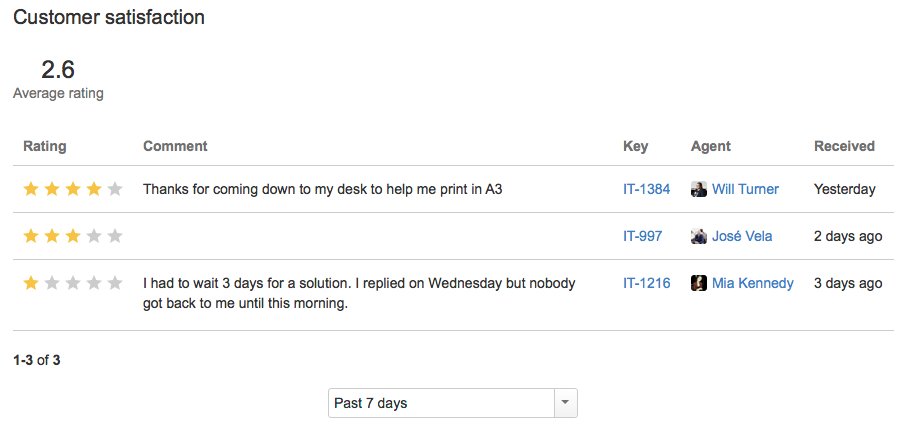
In addition to this built-in 5-star rating, you can use your Jira data to directly extract deeper behavioral Experience Indicators (XIs) without the need for third-party survey tools
Ticket Reopen Rate (RR): If a ticket is marked "Resolved" within the SLA window but reopened days later, it's a massive red flag. High reopen rates mean agents are providing rushed, poor-quality fixes just to stop the ticking SLA clock.
First Contact Resolution (FCR): Resolving a user's problem on the very first interaction, without bouncing them between complex tier-based queues, strongly correlates with high customer satisfaction.
Customer Effort Score (CES): Move beyond basic 5-star ratings. Measure how "easy" it was for the user to get their problem solved to identify technically successful but highly bureaucratic workflows.
Once upon a time, SLAs were the only measure of ITSM performance. Those days are over. We need to combine outcome-driven XLA measurements with Jira SLA to prevent the Watermelon Effect.

A Complete Guide: SLAs and Service Contract Management in Jira

Timepiece - Time in Status for Jira: Atlassian Forge Migration Guide