By
Emre Toptanci
on 06/08/2024, 11:09
Last updated on 6/26/26, 12:01 PM

If you manage software projects, configure workflows, or run daily stand-ups, you spend a massive portion of your day staring at Jira.
When Atlassian officially rolled out native Dark Mode, it quickly became the default setting for millions of users. Staring at a bright white screen for eight hours a day causes undeniable eye strain. But adopting the dark theme created a new, highly specific frustration: clicking out of a dark Jira backlog and into a third-party reporting app, only to be hit with a blinding white screen.
We are officially fixing that harsh experience. With the latest release of Timepiece - Time in Status for Jira, we are introducing full, native support for Jira Dark Mode.
The Importance of Visual Ergonomics in Data Analysis
Building a reliable reporting app requires more than just accurate database queries; it requires serious attention to visual ergonomics. When you are trying to locate a bottleneck in a massive matrix of cycle times and lead times, visual comfort is a practical necessity.
Major enterprise platforms from Microsoft to Atlassian prioritize dark themes specifically because reducing screen glare improves user focus and reduces visual fatigue during long sessions. If your operating system and your core Jira instance are already set to a dark theme, your reporting tools must respect those system preferences.
Timepiece now automatically detects your Jira theme preference and adjusts its interface to match exactly, ensuring a comfortable working environment from your first morning login to the end of the day.
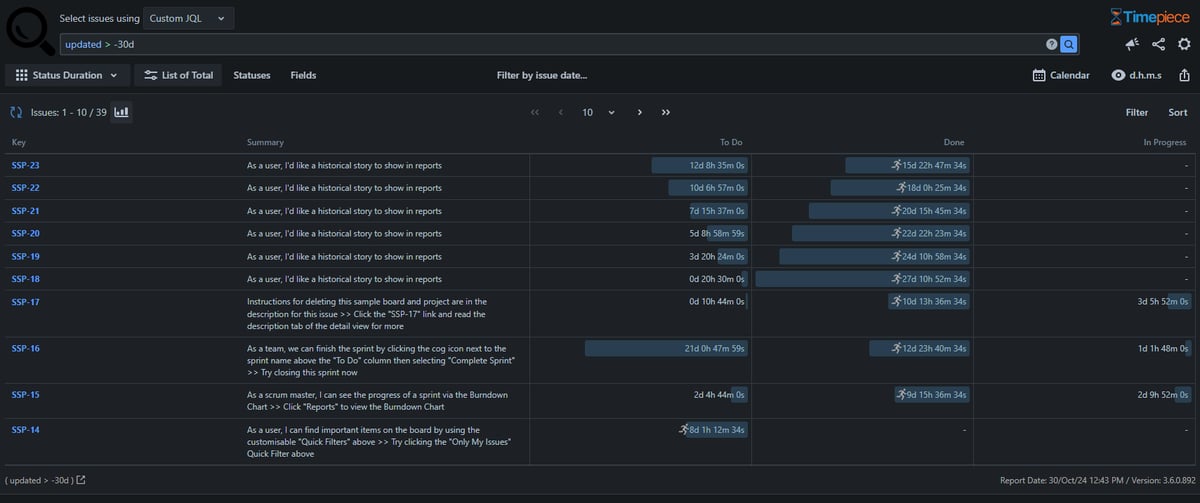
A Consistent Dark Theme Across All Reporting Screens
We did not just change the background color of the main menu. We completely overhauled the application's CSS to ensure that every chart, data table, and settings menu looks native to your dark Jira environment. The new theme applies directly to four core areas of the app:
The Main Reporting Page
Your large data tables, charts, and conditional highlighting rules are now fully optimized for low-light reading, keeping text legible without the harsh background glare.
Jira Dashboard Gadget
This is a massive visual upgrade for office environments. Many engineering teams display their Jira dashboards on large TV monitors on the wall. Previously, a bright white Timepiece gadget on a dark Jira dashboard looked entirely out of place. Now, your reporting gadgets blend perfectly into your existing dashboard aesthetics.
Issue View Screen Tabs
When a developer or support agent clicks the Time in Status tab on a specific Jira ticket to check its history, they no longer lose their dark context. The data loads natively within the dark issue view.
Timepiece Admin Screens
We extended the same courtesy to Jira administrators. When you are configuring parameter sets or managing API tokens in the backend, you get the same dark mode experience.
Available Now for Jira Cloud and Data Center
If you are using Timepiece for Jira Cloud, Dark Mode is already live. You do not need to configure anything in the app itself; Timepiece will automatically mirror whatever theme preference you have selected in your personal Atlassian profile settings.
If you use on-premise hosting, Dark Mode is officially available for Timepiece for Jira Data Center starting with version 5.3.0.
Identify Bottlenecks in Jira with Timepiece
Timepiece is available on the Atlassian Marketplace with a 30-day free trial. If you manage a small team, the app is completely free for Jira Cloud instances with up to 10 users. You can always book an online demo with our expert to learn more about Timepiece.
Install it today to identify workflow bottlenecks in Jira, track time in status, cycle time, and lead time.

Timepiece - Time in Status for Jira: Atlassian Forge Migration Guide
New Feature: Scheduled Reports & Alarms for Timepiece – Time in Status for Jira