By
Emre Toptanci
on 06/08/2024, 11:09
Last updated on 9/29/26, 2:23 AM

Timepiece – Time in Status for Jira calculates averages by getting the sum of values in a column and dividing it by a denominator. Which denominator it uses is up to you, and the choice can change your numbers more than you'd expect.
Two Ways to Calculate an Average
By default, Timepiece divides the total by the number of non-empty values in that column. For example, in an In Progress column on a Status Duration report, that means the average In Progress time of only the issues that actually visited In Progress. Issues that never touched that status are left out of the calculation entirely.
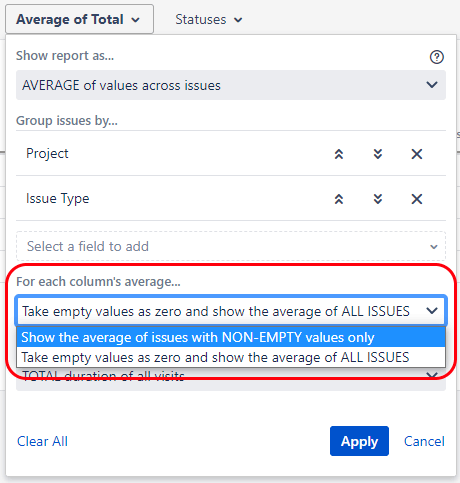
Some teams need the other option instead: treat any issue that never visited a status as a zero, and divide by the total number of issues in the report, not just the ones with data. Timepiece calls this the Average Denominator setting, with two options:
-
NON-EMPTY (the default): divide by the number of issues that have a value in that column.
-
ALL ISSUES: divide by the total number of issues in the report, treating missing values as zero.
This applies to both Average reports and Standard Deviation reports, since Standard Deviation is calculated from the same average data under the hood. If you're using Standard Deviation and your numbers look off, this setting is worth checking too, not just on Average reports.
Which One Is Right for Your Workflow
The correct choice depends on your workflow and what "missing" actually means in it. Say your workflow is Open → In Progress → Resolved → Closed, but you've also added a shortcut transition straight from Open to Resolved, for issues simple enough to skip review entirely.
If you use NON-EMPTY, those fast-tracked issues get excluded from the In Progress average, which quietly inflates it, since only the slower issues that did pass through In Progress count. If you want the shortcut to pull your average down, reflecting that some issues skip that step entirely, use ALL ISSUES instead.
On the other hand, say your report mixes several issue types, and some statuses only exist in the workflow of one issue type. Here, ALL ISSUES would divide by issues that had no way of ever reaching that status, which distorts the average in the other direction.
NON-EMPTY is the better fit here, since it only counts issues that could realistically have a value. As always, the right choice depends on your business case, not a fixed rule.
A Gotcha with Consolidated Columns
If you're using consolidated columns, which combine several statuses into one column, there's a detail worth knowing before you rely on the numbers. A consolidated column only counts as "empty" for an issue if every status underneath it is empty for that issue. That has a direct effect on how the two settings behave:
-
With NON-EMPTY, a consolidated column's average will usually not equal the sum of the averages of the individual statuses under it.
-
With ALL ISSUES, it will equal that sum. If you've ever added up the averages of individual statuses and gotten a different number than the consolidated column shows, this setting is almost certainly why.
The same logic applies per group if you're using Group By: NON-EMPTY divides by the count within each group, and ALL ISSUES divides by the total issues in that group.
The Average Denominator selection is available on the main reporting page, in dashboard gadgets, and through the REST API. Full details are in the Report Options documentation.
Want to try it? Start a 30-day free trial. Timepiece is free on Cloud for teams up to 10 users. You can also book a demo meeting.

Jira Time in Status Guide: App Comparison & FAQs

Tracking Reopen Counts with Timepiece – Time in Status for Jira