
By
Melisa Mutlu
on 04/11/2026, 18:32
Last updated on 11/4/26, 6:35 PM

When a release slips, stakeholders ask two questions: "Why?" and "Since when?" And often, the answer comes from memory, not facts: "Scope grew," "the estimates were off," or "things kept getting pushed."
It is difficult to take action on those responses. You cannot defend a new deadline or improve the planning process without knowing what changed, when, and who changed it. So the same delay can happen again in the next release.
Jira has the information already. Jira logs each time a work item is added to an Epic, a story is pulled into a running sprint, or a due date is changed. Reading that history for an entire project or Epic is the challenging part. Nobody has time to go through the history of 60 work items one by one.
This article shows how to answer the "why" with Historian - Issue History for Jira in 3 cases: scope creep, sprint changes, and late work.
What Is a Work Package in Jira?
A work package is a group of work items that you plan and deliver together. There are three common ways to group them:
- With an Epic. The Epic is the parent of each work item (parent = PROJ-100).
- With a component. Each work item has the same Component value (component = "Payments").
- With a custom field. Each work item has the same value in a select list field, such as "Work package" ("Work package" = "Phase 2").
Watch the field that groups the items. Its history shows how the package changed.
Why Can’t JQL Show When Scope Changed?
JQL can't search the past values of these fields. Atlassian's JQL field reference lists WAS and CHANGED as unsupported for Parent, Sprint, Component, Due, and select list custom fields. So parent = PROJ-100 shows the Epic today, not at kickoff. And each work item's History view covers only that one item, which isn't practical for 60 or 600 items.
How Do You Find Scope Creep in Jira?
Here is the pain: The package grew, but no one can say by how much, when, or who added the work. Without that, a project manager can't explain the delay or ask for more time with confidence.
Scope creep builds up a few work items at a time. Each addition looks small, but together they push the deadline back. When the delay shows, nobody can say how much the package grew, when, or who added the work. Without that evidence, a scope problem looks like a delivery problem.
The Work Item History Report in Historian - Issue History for Jira shows shows every change to the field that defines your package, such as Parent or Component, in one report. Each change comes with a date and a name. Filter it to changes after kickoff, and you can tell stakeholders: ‘'8 items were added after kickoff. Here's when, and who added them.’' The deadline debate becomes a scope discussion.
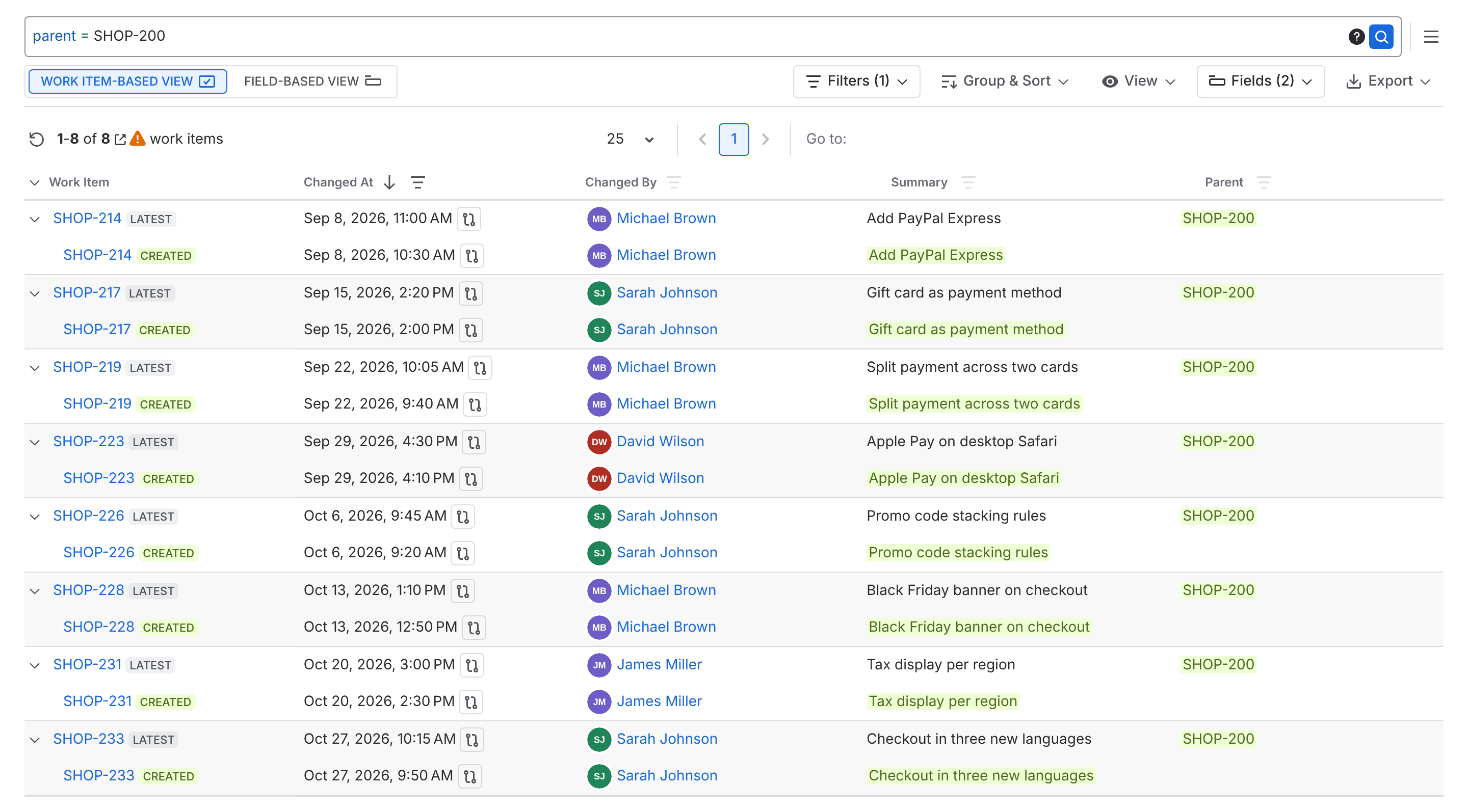
Pro Tip: The report only includes work items that match your JQL query today, so items moved out of the Epic won’t appear. To compare against the original plan, run Historic Query on the same JQL as of your kickoff date. It flags items that didn’t exist yet and shows each item’s Parent on that date.
How Do You See What Was Added During a Sprint?
The sprint ended with unfinished work, and the retrospective turns into opinions. "It felt like a lot got added" doesn't help the team plan the next sprint better.
Jira's sprint report helps. It marks items added after the sprint started with an asterisk, and it shows if story points on completed items were adjusted. Historian goes further: it lists each change with its date, the person who made it, and the old and new values.
Run the report with sprint = "Sprint 24" and select Sprint plus your estimate fields, such as story points. Use the Work Item-Based View with Highlight Changes on, and set Changed At to start on the sprint's start date.
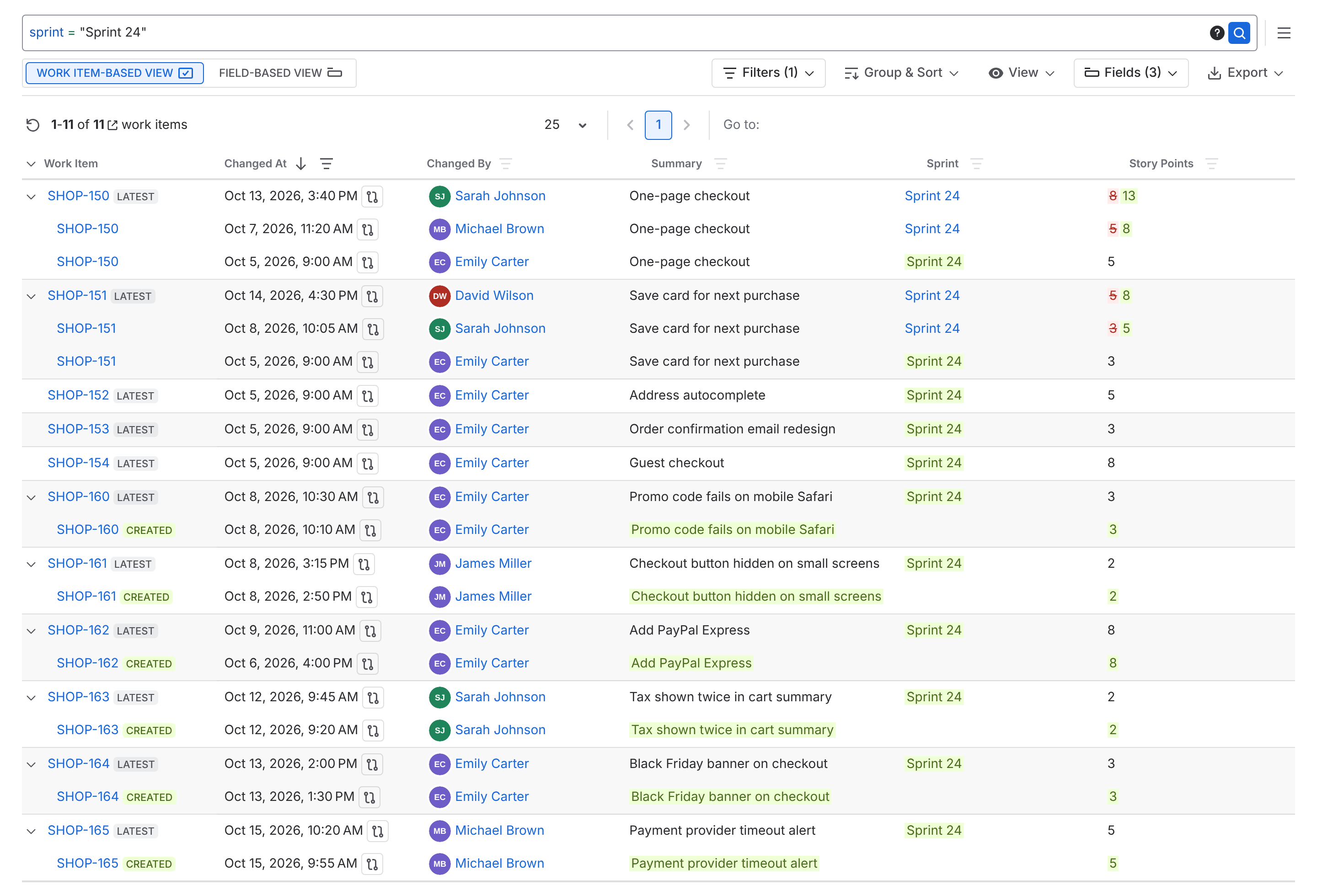
The retrospective starts from facts. "Six items were added after day three, and two were re-estimated twice" leads to a real fix, like a rule for what can enter a running sprint. Over time, that helps the team make sprint commitments it can keep.
Use the Changed By column to improve the process, not to judge people. Late additions usually come from how work gets requested, not from one person.
How Do You Find Out Why a Package Is Late?
The delivery date moved, and no one knows exactly why. New scope, weak estimates, and blocked work each need a different fix. Guess wrong, and the next project slips too.
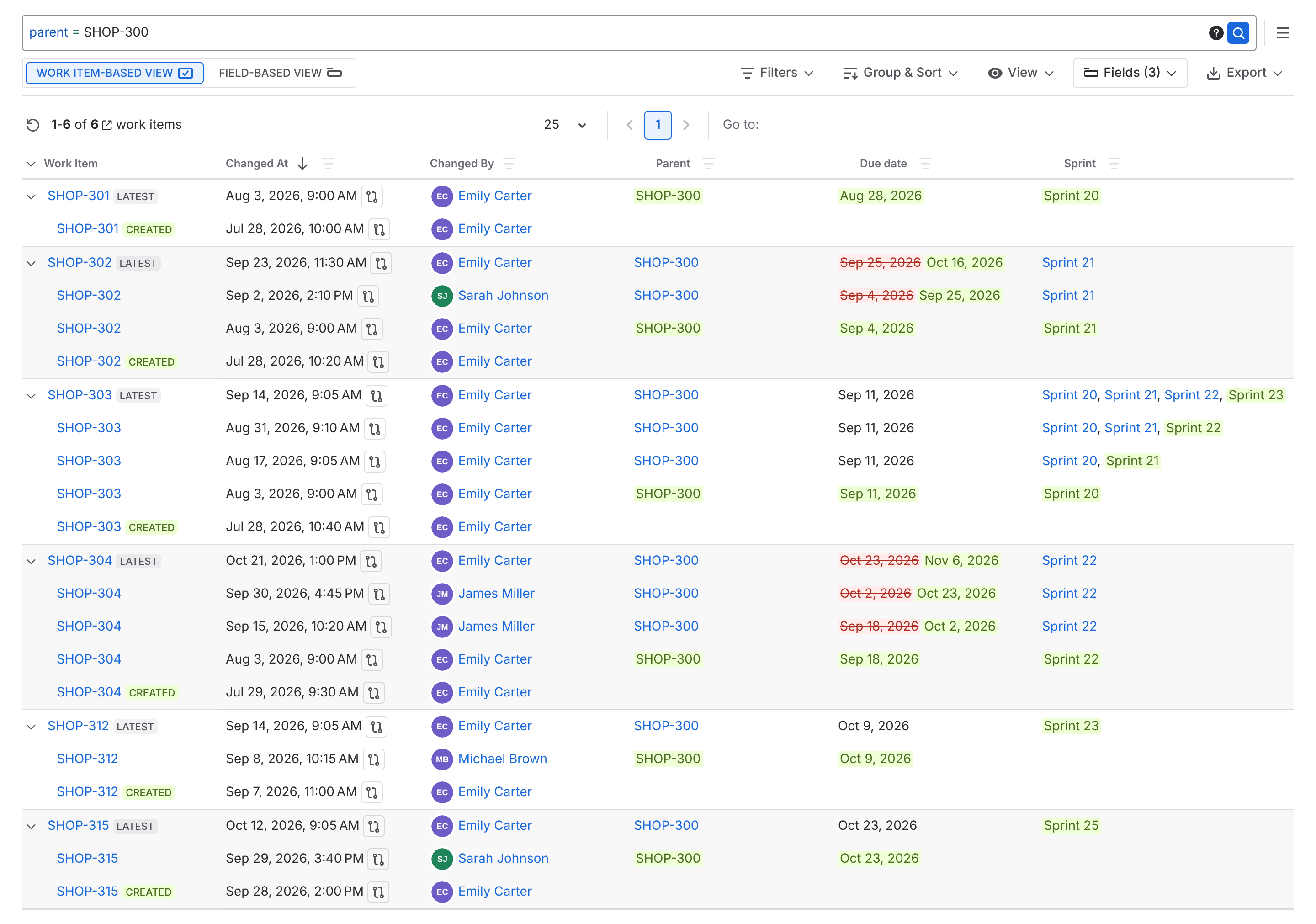
Run the report on the package and select three fields: Parent, Due date, and Sprint. Use the Work Item-Based View with grouping on, and select Expand All to see each item's full timeline.
Then look for three patterns:
- Items added late point to a scope problem.
- Due dates that moved more than once point to an estimation problem.
- Items that moved through several sprints point to a capacity problem or a blocker.
To see the original plan, go to Apps → Historian - Issue History for Jira → Historic Query. Enter the same JQL query and set Show me the results as of to your kickoff date. You'll see each due date as it was on that day. The number badge on the right of each value shows how many times it changed since then.
You can show stakeholders where the plan changed and what caused the delay. And you know which problem to fix before the next project starts.
You can export the report as CSV or XLSX files. It has the same fields, grouping, filters, and work items that you see on the screen.
To try this with your own projects, start a free trial of Historian - Issue History for Jira or book a live demo with one of our experts.

New Feature: Compare Dates to See What Changed in Your Jira Issues

Jira Audit Log vs Issue History: What's the Difference?