By
Melisa Mutlu
on 17/06/2026, 14:45
Last updated on 9/28/26, 11:13 PM

In the Atlassian ecosystem, there is a fundamental architectural distinction that technical writers, compliance officers, and system administrators must understand: the difference between continuous native page versioning and immutable snapshot milestones.
Out of the box, Atlassian Confluence is designed for collaboration. Every time a user edits a page and clicks publish, Confluence creates a new page version. This continuous tracking is an exceptional safety net for daily editing and is incredibly useful in many cases. However, it is not a formal version control system. When an auditor or stakeholder requires you to restore Confluence page history to a specific date across an entire space, relying on native rollbacks introduces severe risks to your active documentation.
Let’s look at the technical limitations of native Confluence rollbacks, and how the "Based on a Date" engine in Baselines for Confluence allows you to retroactively reconstruct an entire space-level milestone safely and cleanly.
The Technical Reality: Why Native Page Rollbacks Fail
Attempting to reconstruct a historical milestone such as a past product release, a signed contract state, or an audit-ready standard operating procedure (SOP) using native Confluence has 3 major problems:
Page-Level Isolation
Confluence page histories are entirely isolated from one another. The platform does not have a native concept of a "space-level timestamp". If your documentation spans fifty interlinked pages, there is no single button to roll back the entire hierarchy. You must open each page individually, navigate to its history, find the correct version from that exact past date, and manually restore it.
Destructive Reversion and Draft Data Loss
When you use the native "Restore this version" feature, Confluence does not simply "view" the past. It copies the historical version and overwrites the active page, publishing it as the new, current version. Here is the critical risk: deleting a draft, unpublished changes, or a page version is permanent and they cannot be restored. If a team member has an active, unpublished draft on that page, the content of the draft will be lost when you restore a previous version. Furthermore, this destructive overwrite alters your active production environment, disrupting teammates who are currently editing documentation for the next release cycle.
The Attachment Versioning Issue
Technical documentation is rarely just text; it contains architectural diagrams, process flows, and specification spreadsheets. Under native Confluence behavior (documented under Atlassian's long-standing issue CONFCLOUD-2533, page versioning and attachment versioning are often decoupled in the viewing layer. If you view or restore a historical page version, Confluence will render the old text, but the current behavior of Confluence is to show the latest version of the attached image. This mismatch breaks document traceability and fails basic regulatory audits.
How to Rebuild the Past in Confluence
Before trusting an application with your compliance data, it is vital to establish vendor authority. Baselines for Confluence is developed by OBSS, an Atlassian Gold Marketplace Partner with over 15 years of experience in the ecosystem. OBSS is an ISO 27001-certified vendor , and the application itself is a Cloud Fortified App that actively participates in the Atlassian Marketplace Bug Bounty Program.
To solve the native platform limitations, Baselines for Confluence acts as a time machine for your spaces. Instead of modifying your active pages, the app allows you to capture specific versions of pages and attachments at a particular point in time.
How Baseline Creation Works
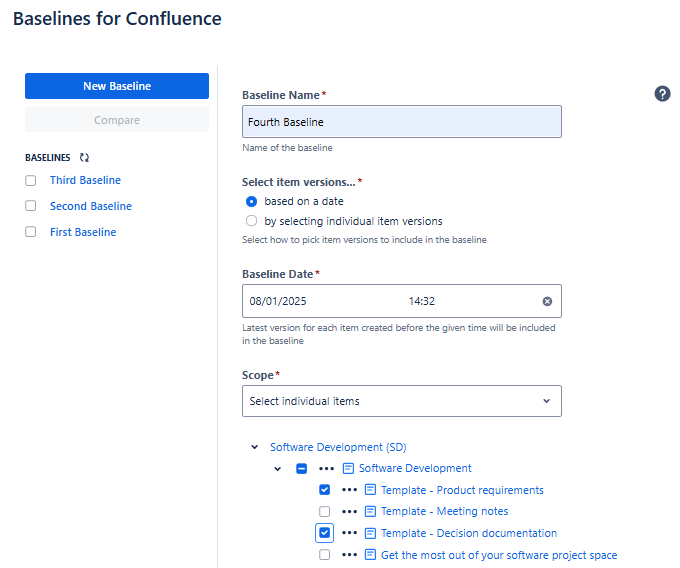
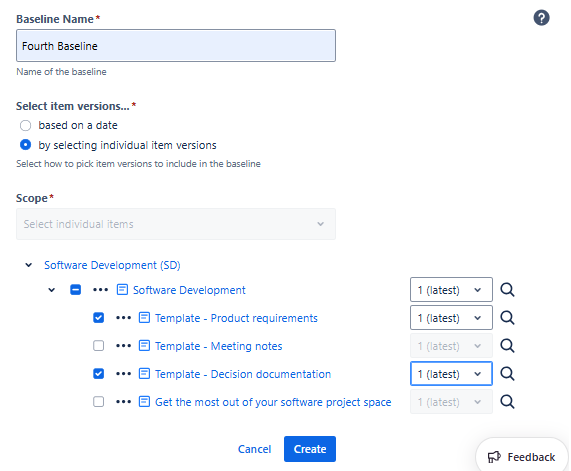
Instead of altering your live pages, the app creates a named, immutable baseline without destroying active drafts. When creating a baseline, the application provides two primary options :
Based on a Date: This option allows you to select file versions based on a specific date. The app automatically includes the latest version of each document that was available before the given date. This serves as an automated, retroactive time machine. With Based on a Date feature, you can create Baselines for past dates after installation.
By Selecting Individual Item Versions: This alternative provides granular control by allowing you to select specific versions of individual items and attachments. This is crucial for defining exactly which revision of a requirement or specification belongs in the official record.
How to View, Compare and Export Baselines
Once your baseline is saved, it becomes a tamper-proof record perfect for audits:
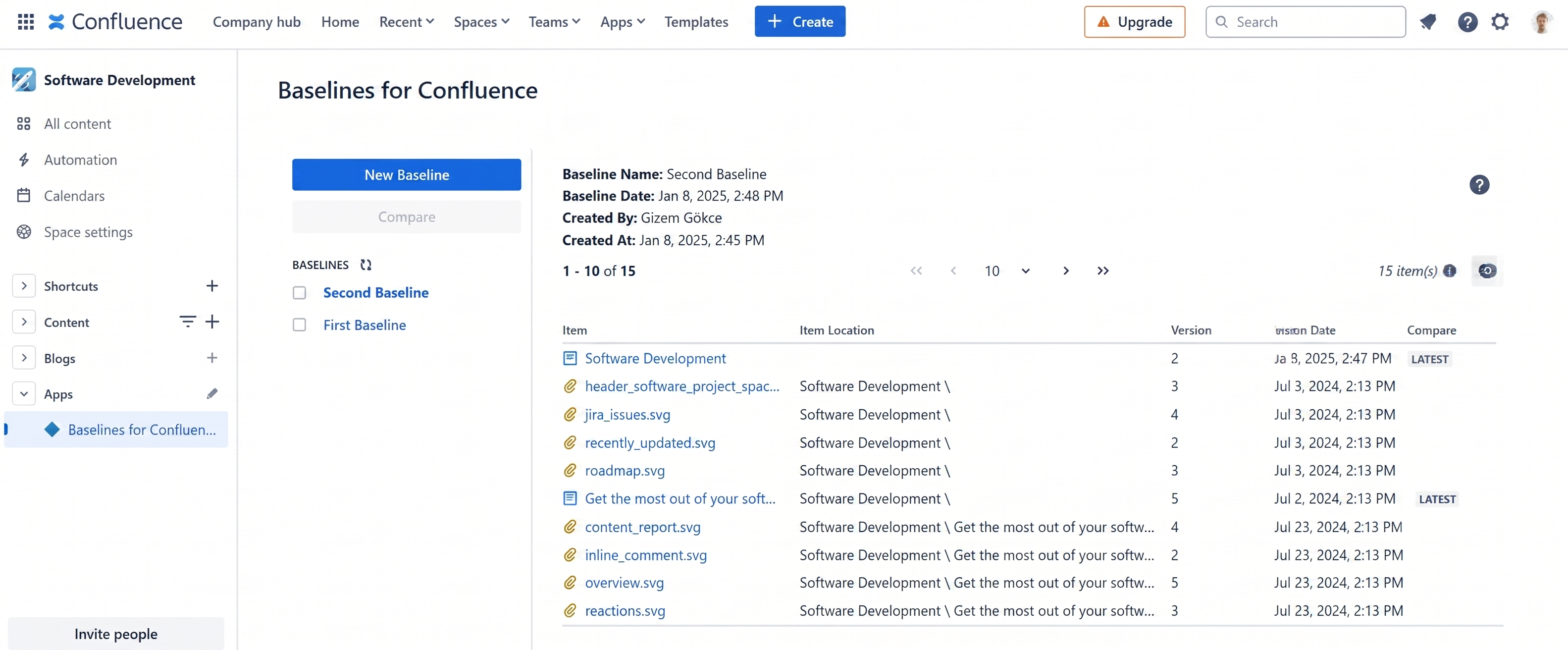
View Historical Contents: Open any baseline from your space menu to instantly see a list of every included page, blog post, and attachment alongside its specific version and date. You can click any title to jump directly to that exact historical version.
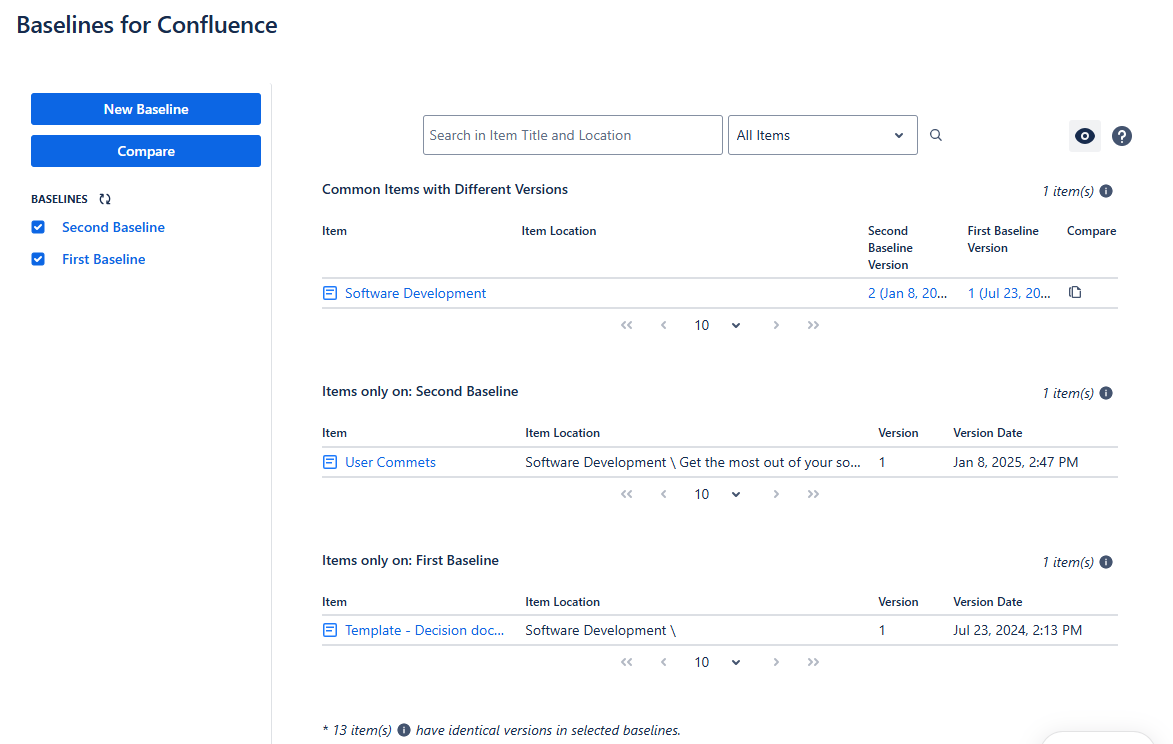
Visual Diff Comparison: Instantly compare two baselines (like "v1.0" vs "v2.0") side-by-side to see exactly what was Added, Removed, or Changed.
Audit-Ready Exports: Export individual pages or the entire baseline as a PDF or CSV file for compliance officers.
By separating daily, collaborative editing from formal, frozen milestones, Baselines for Confluence gives you the best of both worlds. Your team can continue working on pages for the next release, while you retain the ability to step back in time, reconstruct any historical milestone, and keep your organization fully compliant.
You can learn more about Baselines for Confluence by visiting its Atlassian Marketplace page. Also, you can book a demo meeting with our experts.

Confluence 9 Support and Improved Performance for Baselines

Baselines for Confluence: Now Available on Cloud and Data Center