By
Emre Toptanci
on 06/08/2024, 11:09
Last updated on 6/12/26, 11:16 AM

Baselines for Confluence v2.6 is released this week. This new release introduces Confluence 9 compatibility as well as some other app performance improvements. Also, the latest version (v2.2) of Baselines for Confluence was recently released.
Confluence 9 Compatibility
Confluence 9 was a major platform update release from Atlassian. It contains many changes and upgrades in the core components of Confluence. As a result, it took longer than expected for us to complete the tests for a compatible release.
But here we are. We are not officially introducing Confluence 9 Compatibility for Baselines for Confluence.
Larger Baselines
We witnessed some customers experiencing errors when saving very large (I mean extremely large) baselines. Our inspections on this matter revealed data size limitations in Confluence’s own database.
To overcome these limitations, we improved the way baselines are saved in the Confluence database. As a summary, instead of saving a baseline as a single large chunk of data, we are now saving each baseline in pieces. This makes the data more manageable and also allows the creation of much larger baselines.
Improved Performance
As a side benefit of the new baseline data management structure, Baselines for Confluence now has improved performance for large baselines.
Since the app doesn’t need to read the whole baseline data every time, displaying the baseline content on the screen or performing searches in the baselines is significantly faster. The performance improvement is particularly evident in 30K+ document baselines.
Better Search and Filter Capabilities for Baselines
The latest version (v2.2) of Baselines for Confluence was recently released to Atlassian Marketplace. This new release introduces search and filter improvements to Baselines View and Baseline Compare screens.
Both screens now support the Search option, which means you can search for a keyword in document names and/or document location (which previously was only available for the View page).
Additionally, the search clause is now highlighted in the results, which significantly increases usability.
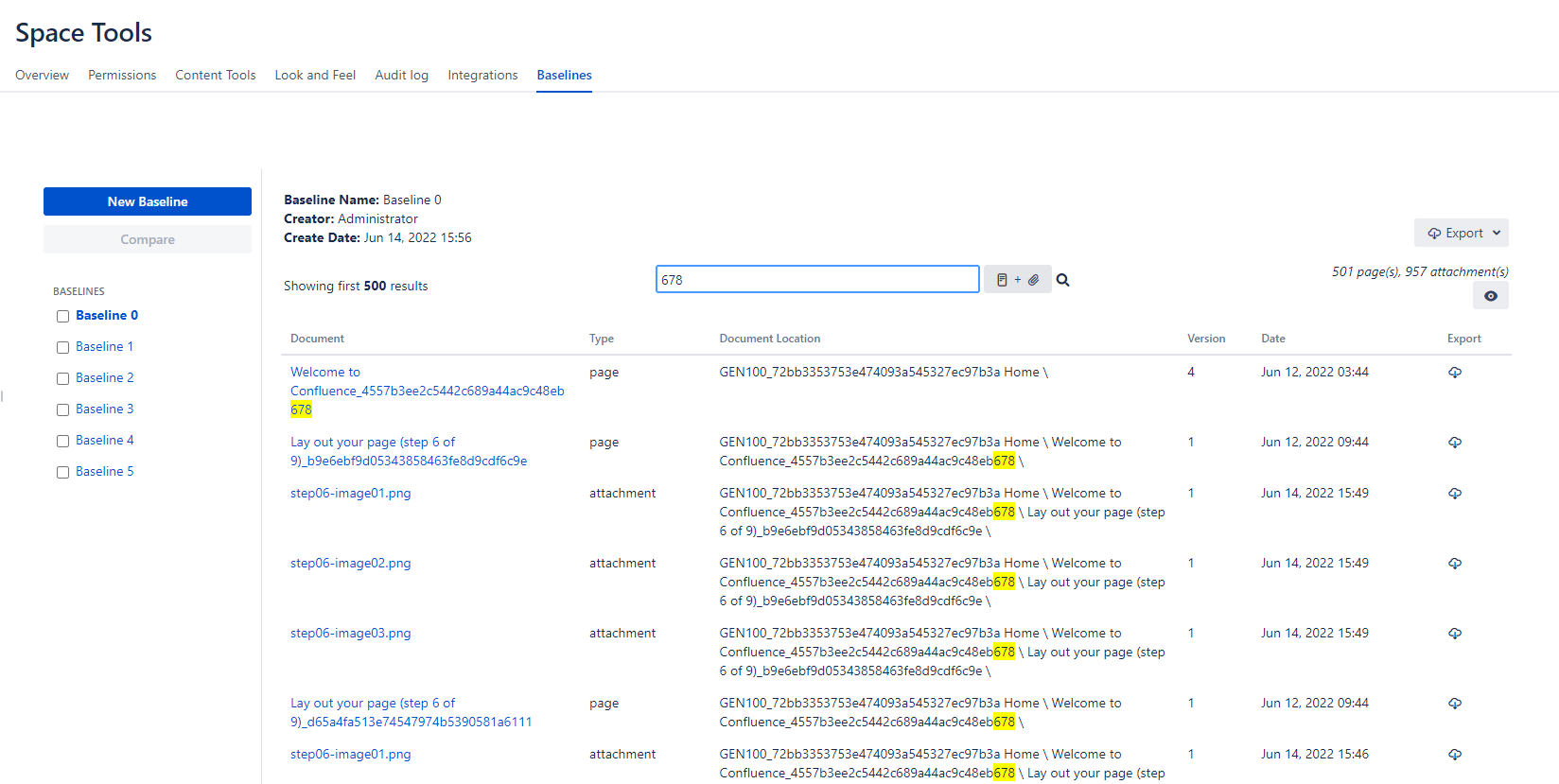
Filtering by Document Type
A document type filter is available as part of the search function on both screens. Now you can filter your documents to see only Pages, only Attachments, or Pages & Attachments together.
Trim or Word Wrap
Both View and Compare pages now contain a view menu is the option to Trim or Wrap long columns. Until this version, long texts in Document Name and texts in the Document Name and Document Location columns were trimmed to fit the page. Location in particular is almost always longer than the available space on the page so it was almost always trimmed.
With this new option, you can choose to trim the text or wrap it as a multi-line text so all text is visible on the page.
With improved data management and Confluence 9 compatibility, Baselines for Confluence is better than ever.
To learn more about Baselines for Confluence, you can visit its Atlassian Marketplace page.

Baselines for Confluence: Now Available on Cloud and Data Center

Moving Beyond Native Confluence Page History for ISO Compliance and Audits