By
Birkan Yildiz
on 12/06/2026, 14:15
Last updated on 9/28/26, 11:04 PM
Jira features a highly effective Agile hierarchy that organizes work from macro-level business objectives to the daily technical execution level. The structuring flexibility is the foundation of successful software development. Another important aspect of it is that accurate reporting of the time is required at every level of this hierarchy.
In this blog, we’ll break down the core logic of Epics, Stories, and Tasks in Jira, and detail how to extract exact time in status reports for each using Timepiece - Time in Status for Jira.
Jira Agile Hierarchy
The Agile hierarchy in Jira exists to maintain a balance between organizational structure, flexibility, and clear progress reporting. It ensures that the daily technical tasks of the engineering team directly contribute to broader business goals.
Initiatives
By default, the standard Jira hierarchy ends at the Epic level, meaning any structural levels above it do not exist out of the box. However, organizations using Jira Premium or Enterprise with Advanced Roadmaps can customize this structure by adding one or multiple hierarchy levels above the Epic to track larger goals. While many teams refer to this top tier as an "Initiative," the naming is entirely flexible. You can name these higher levels whatever best suits your organization's needs. These represent large-scale organizational goals that compile Epics from multiple teams and typically span multiple quarters or an entire year.
Timepiece fully supports reporting on these custom hierarchy levels configured above Epics (such as Initiatives, Programs, Projects, or Themes). Using the 'Hierarchy Level' fields, you can either display these parent levels as individual columns in your detailed list reports or use them to group and aggregate metrics in your pivot reports.
Epics
Epics are large bodies of work that represent a high-level, unifying objective. Teams generally use Epics to group related stories that collectively contribute to a larger feature or product goal, such as "Build a performance management module".
The logic behind an Epic is to provide the development team with everything they need to be successful without overwhelming them with microtasks immediately. Any work estimated to take weeks or months to complete should be classified as an Epic and subsequently broken down into smaller components.
Important Note: When you roll up status times to the Epic level in Timepiece, the report only includes the durations of direct child records at the standard issue level (such as Stories and Tasks and sub-tasks.).
Stories (User Stories)
User Stories represent small, sprint-sized tasks that a team can commit to finishing within a 1 or 2 weeks. The core logic of a user story is to keep the engineering team focused on real-world problem-solving rather than just executing technical checklists. Stories are written from the perspective of the end user, utilizing a standard template: "As a [user], I want [goal] so that [reason]". The lifecycle of a Story follows the 3 C's:
Card: The initial written description of the story.
Conversation: Collaborative discussions during backlog refinement to clarify technical implementation.
Confirmation: The establishment of acceptance criteria that define when the story is testable and completed.
Tasks and Subtasks
While Stories focus on end-user value, Tasks are used for specific technical actions, internal engineering work, or administrative duties. Subtasks are the most granular units in Jira, used to break down Stories or Tasks into bite-sized, daily deliverables for individual engineers.
Configuring Total Status Durations for Epics
Epic is a parent container for multiple Stories and Tasks; simply looking at the time the Epic itself spent in "In Progress" often fails to reflect the reality of the engineering effort. To get a true 360-degree view of an Epic's progress, you must calculate the duration across all of its child issues. Timepiece - Time in Status for Jira provides specific features to achieve this.
Select the project you want to generate report and select the Status Duration report.
.jpg?width=727&height=707&name=statusduration1%20(1).jpg)
Click the List of Total button and select Sum option.
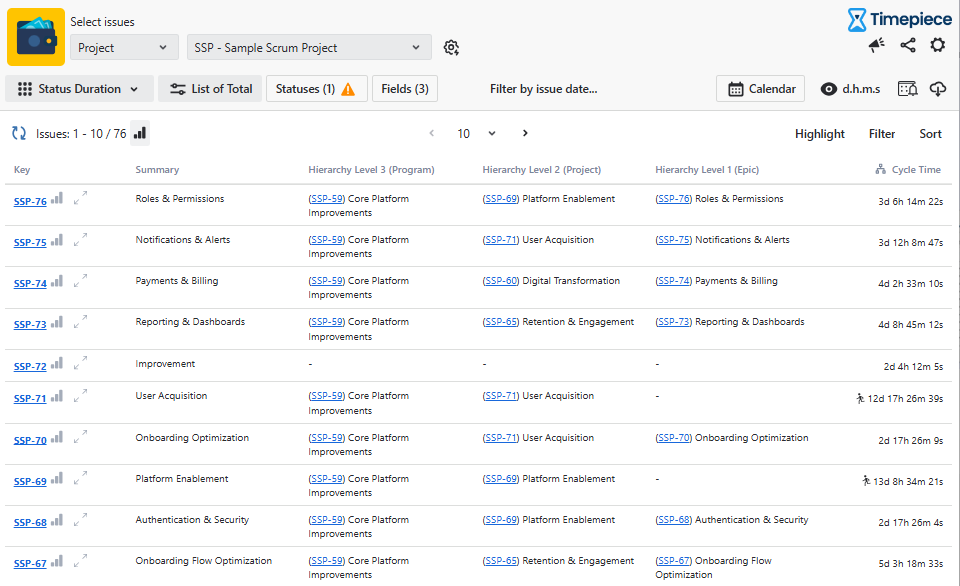
Then, select Hierarchy Level 1 (Epic) (or any other custom hierarchy level you want to analyze) in the 'Group issues by...' section of the Report Options side-panel, and click Apply.
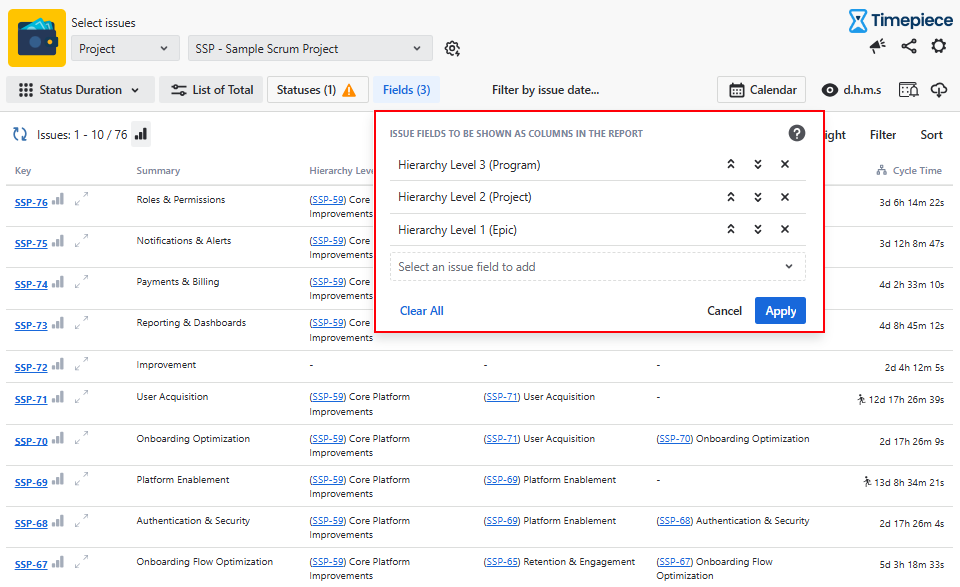
Click Statuses. You can add any statuses in your workflow or create Consolidated Column to measure metrics like Cycle Time or Lead Time.
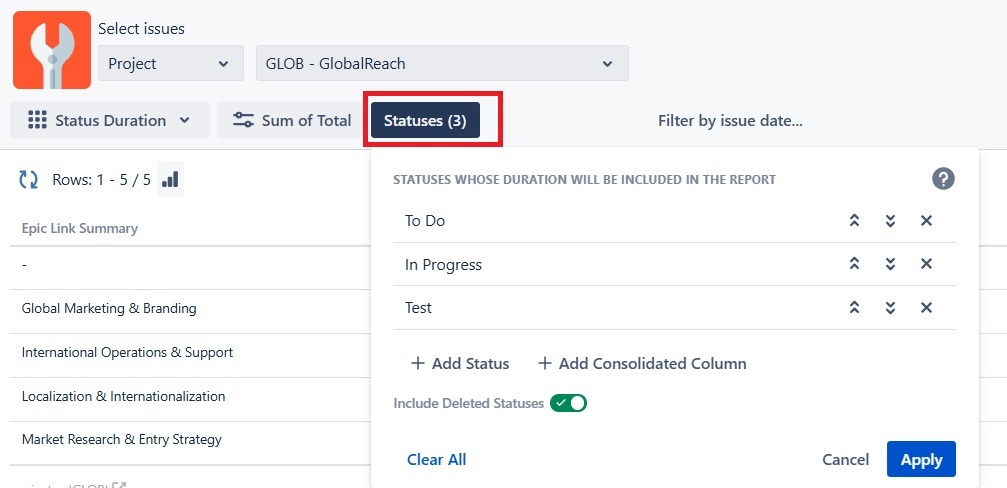
This instantly gives you the total duration for specific phases of your workflow, rolled up at the Epic level.
Configuring Reports for Stories and Tasks
At the Story and Task level, the primary goal of reporting is to identify workflow bottlenecks, balance workloads, and track Sprint efficiency.
You can extract this data using the main Timepiece reporting page or by adding Timepiece gadgets directly to your Jira dashboards.
Status Duration Report: This is the foundational report of Timepiece. It measures exactly how long issues stay in each workflow status. If your team's Stories are consistently losing time in the "Code Review" status, this report will highlight the exact bottleneck.
Assignee Duration Report: Instead of looking at workflow steps, this report tracks the total working time per team member (human or AI agent). It is critical for identifying human-centric bottlenecks and ensuring work is distributed fairly across the team.
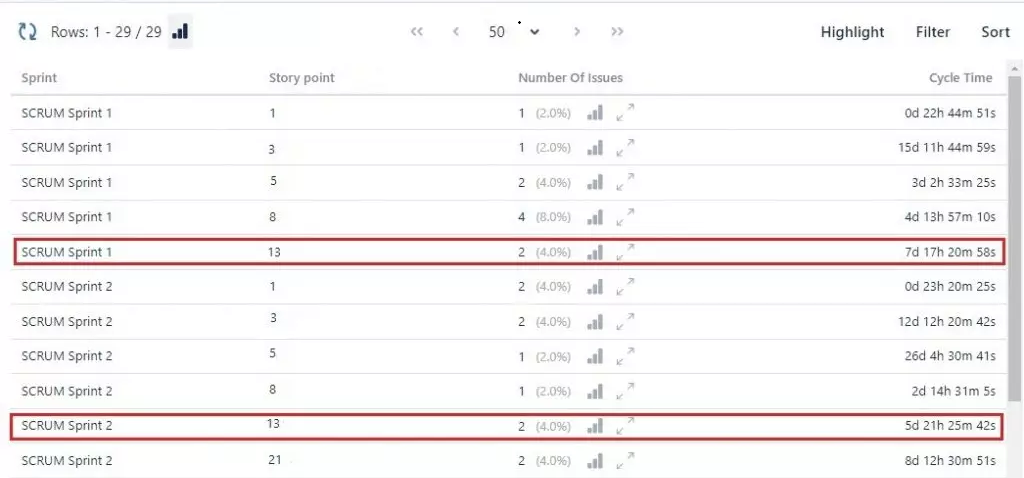
Report Options for Sprints: Instead of viewing a raw list of individual tasks, you can use the Report Options button on the Timepiece toolbar to switch from a "List" report to an "Average" or "Sum" report. By grouping the data by "Sprint" and "Story Points," Timepiece automatically calculates the Average Cycle Time for specific story point values across your sprints.
Pair Jira Architecture with Accurate Status Reporting
A well-structured Jira Agile hierarchy is the foundation of a transparent and efficient engineering workflow. When you accurately organize Epics, Stories, and Tasks, your team understands exactly how their daily work connects to all-around business goals. However, structure alone will not highlight workflow bottlenecks or prevent team burnout.
That is where precise time-tracking makes the difference. By using Timepiece - Time in Status for Jira, you can move beyond flat data to measure the exact elapsed time issues spend in specific statuses or assignee queues. Because Timepiece respects your custom business calendars and calculates data roll-ups using native Hierarchy Level fields dynamically pulled from your Roadmaps hierarchy, you get an accurate view of Cycle Time and Epic progress without relying on manual spreadsheet calculations. Pairing a clean Jira architecture with accurate status reporting gives you the visibility needed to spot blocked tasks early, balance workloads fairly, and keep your sprints on schedule.
Explore Timepiece - Time in Status for Jira today and start your 30-day free trial. You can also book a demo meeting.

Time Between Statuses in Jira: Meaning & How to Track It
How to Search Cycle Time and Lead Time Using JQL