By
Gizem Gokce
on 06/08/2024, 11:09
Last updated on 9/29/26, 2:02 AM

Creating a Timepiece - Time in Status for Jira report takes time. You pick the right fields, set the date ranges, and filter the data. Once you have it right, you can save it as a Parameter Set to use later. But until now, if you wanted to put that exact same report on a Jira dashboard, you had to build it again from scratch. That takes too much time. So, we fixed it. You can now configure Timepiece dashboard gadgets using your saved Parameter Sets.
What Are Timepiece Dashboard Gadgets?
Jira dashboards give you a high-level view of your work. Timepiece gadgets let you add your time-in-status reports directly to those dashboards. You don't have to open a separate reporting page to see bottlenecks or check how long issues stay in progress. Your time reports sit right next to your other Jira metrics.
How to Use Parameter Sets with Gadgets
When you add a Timepiece gadget to your dashboard, open the configuration panel.
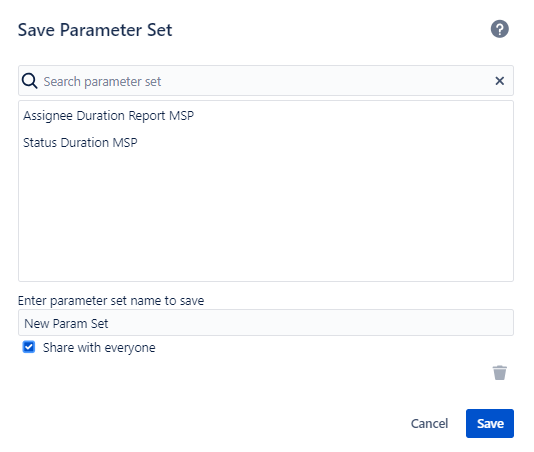
At the top, you now have a choice. You can set up the parameters from scratch, or you can select a saved Parameter Set. When you choose a saved set, the gadget automatically pulls all those report parameters.
And here is the best part: if you update that Parameter Set later on the main reporting page, your dashboard gadget updates too. You don't have to touch the gadget settings again. And gadgets you configured before will keep working exactly as they are.
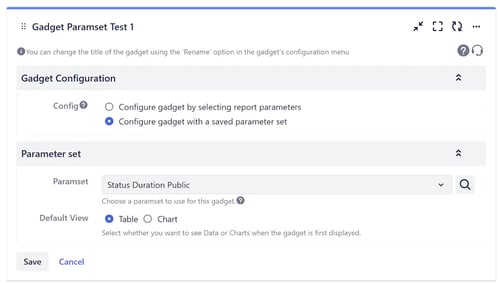
When you open the configuration page of a Timepiece gadget, at the top of the config panel you can select to configure the gadget with a parameter set or configure all parameters from scratch.
When the “Configure gadget with a save parameter set” option is selected, the report parameters in the selected parameter set will be used for the gadget.
Build Reports with the Timepiece AI Assistant
If you need a new report but do not have a Parameter Set ready, you can use the Timepiece AI Assistant. This AI helper is built right into the app and is available directly inside your Jira gadgets. Instead of clicking through menus or figuring out filters, you can justtell it what you need in plain English.
For example, you can say: "Help me measure Cycle Time for project ABC from In Progress to Done, but don't count time spent On Hold." The assistant understands your workflow and custom calendars. It handles details like weekends and holidays automatically. Then, it creates a ready-to-use report with the right settings applied. You do not have to be a Jira expert to get the exact data you want on your dashboard. You can always save and share these configs too.
How New Save/Load Feature Helps You?
This feature does two things. First, it saves you time. You no longer need to manually copy settings from your main reports to your dashboards. Second, it keeps your data consistent. If your team decides to change a filter or track a different set of statuses, you only update the Parameter Set once. Every gadget using that set updates instantly. It reduces repetitive work and ensures everyone is looking at the same data.
You can learn more about Timepiece – Time in Status for Jira by visiting its Atlassian Marketplace page.

Jira Integrations: Use Parameter Sets in Timepiece REST API

Quick Filters: Adjust a Timepiece Report Without Changing Its Setup