By
Emre Toptanci
on 06/08/2024, 11:09
Last updated on 9/29/26, 2:23 AM

This week’s release for Time in Status Server/Data Center (v4.22.0) is packed with new features and highly requested reporting improvements.
Multi Visit Reporting
Until this version, the Status Duration report in Time in Status only reported the total accumulated time an issue spent in each status. With this new update, you can now report the First, Last, and Average visit durations, alongside the Total time.
Multi Visit reporting also works seamlessly with our existing aggregation options. For example, if you manage a large team, you can now easily generate reports showing the “Average of First Visit” or the “Sum of Last Visit” across multiple issues.
Improved Average Calculation
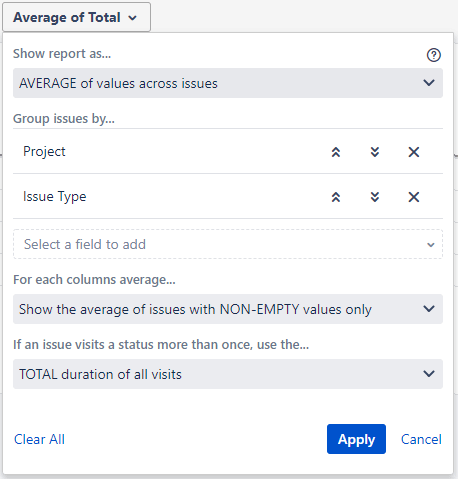
Time in Status used to calculate the average of a column by taking the total value of all issues and dividing it strictly by the number of issues that had a value for that column. Issues with an empty value were entirely excluded from the calculation.
While this produces accurate results for most teams, we received requests from several customers who needed to include those empty values as well. In certain workflows, a ticket might skip over a specific status entirely (moving forward without entering it). Some organizations need to count that skipped step as a "zero duration" when calculating their overall averages to maintain SLA compliance.
Now, Time in Status supports both methods. You can choose whether or not to include empty value issues when calculating averages. There is no single correct answer here; it entirely depends on how your specific workflow is structured and the business logic your organization relies on.
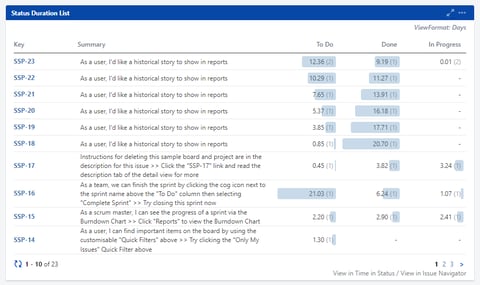
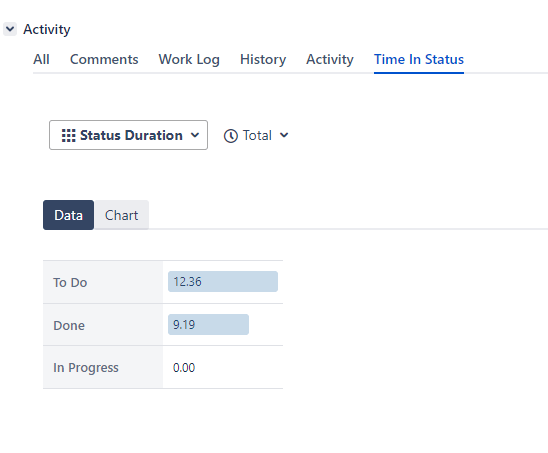
Data bars on Issue View Tabs and Gadgets
Another highly requested feature has just shipped. Data bars are now fully available on both the Issue View Screen tabs and your dashboard Gadgets, making it easier to visualize where time is being spent without leaving the ticket.
As always, you can find Time in Status in its Marketplace Homepage.

Confluence 9 Support and Improved Performance for Baselines
How Can Teams Build a Healthy Time Tracking Culture in Jira? 5 Strategic Best Practices for 2026