By
Gizem Gokce
on 14/10/2026, 13:38
Last updated on 10/14/26, 1:38 PM

Jira is amazing at keeping the history of an issue and that is crucial for reporting. You can't report on something you have no data for. But, it has its own plus and minus.
Jira’s history tab records everything but no export, no cross-issue view, basic date sorting. The moment your question spans more than a single issue (work item), that view stops helping.
In this guide, you’ll learn how to get the full change history for epics, stories, and tasks together, in one filterable, exportable report. Same method for every issue type, because the history lives in the same place: the changelog.
Why Is Jira Issue History Hard to Get Across Many Issues?
Jira's built-in tools handle one issue at a time, and that is the whole problem. The History Tab shows field changes on a single work item. You cannot export it, and you can only sort by date. An epic plus ten child stories means 11 tabs.
JQL can find issues that changed using historical operators (WAS, CHANGED, BEFORE, AFTER). But JQL is only a filter. It returns issues in their current state, so it will not show you the old value, the new value, or who made the change.
None of this depends on whether a work item is an epic, a story, or a task. The limitation is structural, so solving it once solves it for every issue type.
How Do You Get Issue History for Epics, Stories, and Tasks in One Report?
A dedicated reporting layer sits over the changelog and does exactly this job. Historian - History Explorer for Jira reads the full change history for a group of work items and lays it out as a report you can filter, group, sort, and export. You pick the work items with JQL, so one report can hold epics, stories, and tasks side by side.
Here is how:
Open the Work Item History Report
Go to Apps → Historian - History Explorer for Jira → History Explorer to open the main report screen.
Select Your Work Items With JQL
Historian uses a JQL query to decide which issues to include, so you control scope precisely:
One epic and everything under it:
parent = SKP-100 OR "Epic Link" = SKP-100Or, a whole project, every type in it:
project = "Sample Scrum Project"
Historian then fetches the complete change history for every matching work item, whatever its type.
.png?width=1642&height=803&name=image-20261009-124301%20(1).png)
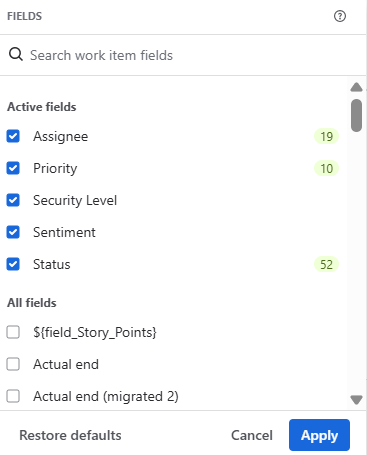
Choose the Fields You Want to Track
Pick only the fields that matter for your question. Selected fields become the columns, so a report tracking Status, Assignee, and Story Points stays readable instead of dumping every change on screen.
Filter, Group, and Sort
Narrow the report to the answer you need. Filter by date range, by the user who made the change, and by specific field values (filters combine with AND logic). Group by work item and sort by field or change date. In Work Item-Based View, turn on highlight changes to color-code what moved.

Export the Report
Ready to leave Jira is your finished report: export it to XLSX or CSV. The file is a chronological record of what changed, who changed it, and when, which makes it an audit-ready evidence trail for a review, an archive, or a stakeholder deck. A Jira admin can restrict who sees the Export button.
Can You See What an Epic Looked Like at a Past Date?
Yes, with Historic Query. Enter a JQL query, then pick a past date and time with the "Show me the results as of" filter. Historian recalculates the selected field values as they were at that moment and shows the work items as they existed then.
Items that did not exist yet on that date are flagged. It is read-only: it shows the past; it does not change the present. That makes it useful especially for retrospectives, root-cause work, and reconstructing a backlog for a review.
%20(1).png?width=3190&height=1464&name=parent-changes-mtp1-33%20(1)%20(1).png)
Why Does Getting History Across Issue Types Matter?
Incidents, audits, and retros rarely stay inside one issue type.
Sprint Retrospectives: See how Story Points, Assignee, and scope shifted across every story and task in the sprint, in one report.
Release Audits: Trace what changed across an epic and all its children, then export the trail as evidence for a SOC 2 or ISO 27001 review.
Troubleshooting: Find who changed a Status or overwrote a Description across all the issues in an incident, not one ticket at a time.
One report for every issue type, filtered to the change you're looking for.
To start your 30-day free trial and get your first cross-issue history report, check the Atlassian Marketplace listing, or book a demo to see it on your own issues.
Introducing Historian: A Clear, Organized View of Your Jira Work Item (Issue) History

A Guide to Jira Issue History: How to Track and Report on Changes