By
Melisa Mutlu
on 05/06/2026, 12:37
Last updated on 9/29/26, 2:23 AM

Automation allows you to focus on the work that matters by eliminating manual, repetitive tasks. Using a simple no-code builder, teams can automate their processes using triggers that kick off a rule, conditions that refine the scope, and actions that actually perform the tasks. But what if your automated workflows could make intelligent decisions based on deep historical time-in-status data?
We are thrilled to announce that Timepiece - Time in Status for Jira now integrates seamlessly with Jira Automation. This means your automation flows can now directly run Timepiece reports and execute actions based on the exact duration data of your work items.
Why Bring Timepiece into Jira Automation?
Native Jira Automation excels at updating fields or sending notifications when a specific event occurs. But it cannot natively query historical data, such as exactly how much time an issue spent in the "In Progress" status over its lifecycle.
By adding the "Timepiece: Run Report" action into your workflow builder, you seamlessly fetch custom duration metrics. You can then use Atlassian's smart values to access and manipulate this data. Whether you need to update issue fields, transition a work item, or trigger alerts, you can now base these actions on precise operational data such as Cycle Time, Lead Time, and Status Duration.
Instead of relying on manual report reviews to identify bottlenecks, teams can use Timepiece data directly inside Jira Automation rules to trigger automatic actions when specific time thresholds are met.
4 Automated Workflows You Can Build Today
This integration reduces administrative friction for engineering and support teams. Here are practical ways to leverage this capability:
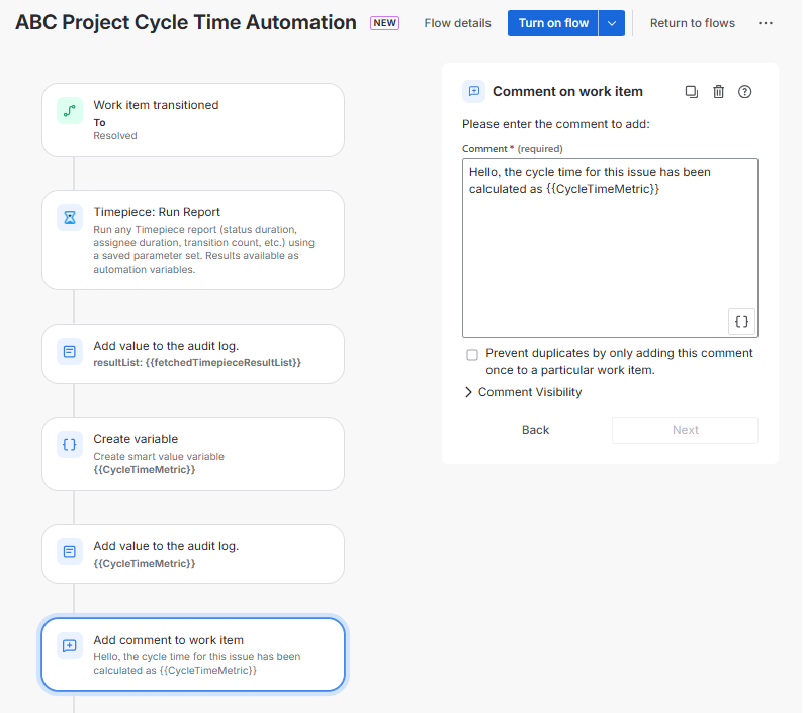
Auto-Comment Cycle Time on Resolved Issues
Instead of manually generating velocity reports, configure a rule that calculates an issue's Cycle Time the moment it is resolved. To do this, first prepare a custom "Duration Between Statuses" report in Timepiece, specifically configured to measure the time from "In Progress" to "Resolved." Triggered by the transition to "Resolved," the automation uses the "Run Report" action to fetch your pre-configured report. It then automatically posts this exact duration as a comment on the issue. This provides immediate transparency.
Predict Realistic Due Dates
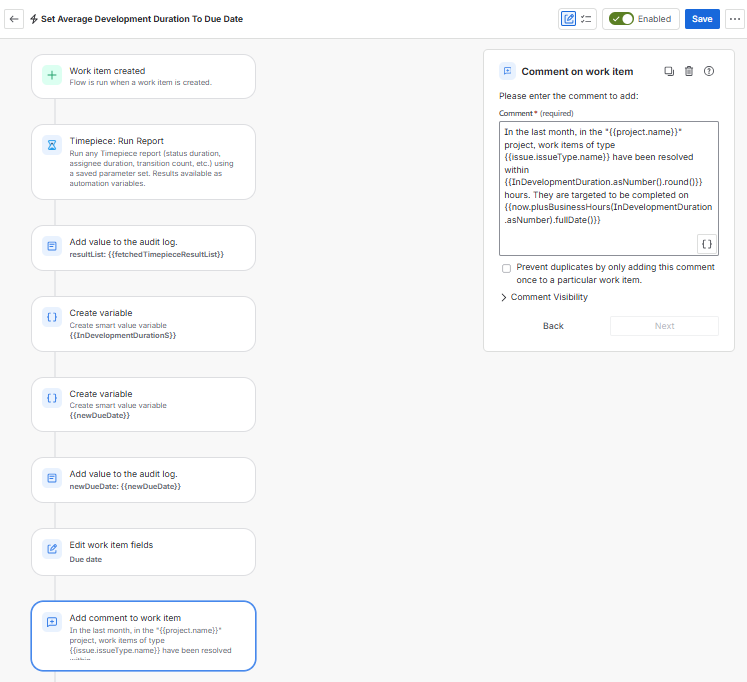
Base your timelines on historical performance. When a new work item is created, an automation rule can run a Timepiece report to calculate the average historical resolution time of previously completed items in that project. The rule dynamically calculates a realistic target and automatically updates the Due Date or Original Estimate fields.
Auto-Close Stale Issues
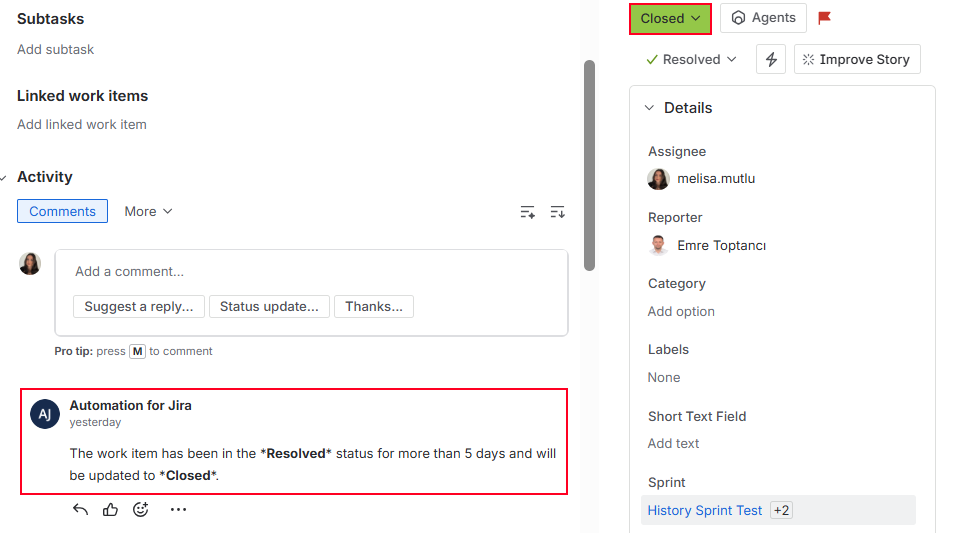
Keep your backlog clean without manual grooming. Build a scheduled process that identifies work items left in the "Resolved" status for an extended period. The automation checks the precise time-in-status data using Timepiece. If the duration exceeds your defined limit, the rule adds a notification comment and transitions the stale item to "Closed."
Automate SLA Breach Notifications
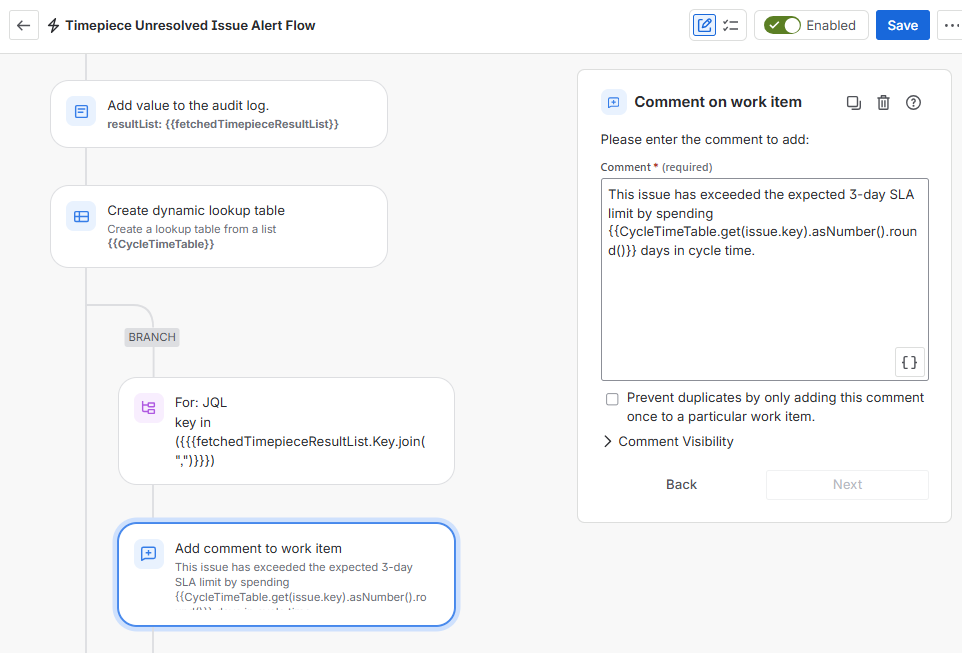
Prevent delays proactively. Schedule an automation to periodically scan active issues and fetch their elapsed times using Timepiece. If the automation detects an issue approaching your defined Service Level Agreement (SLA) limit, it automatically posts a warning comment or alerts the team. This shifts SLA management from reactive reporting to automated intervention.
Start Building Data-Driven Rules
Relying on manual reporting to manage bottlenecks slows down your team. By integrating Timepiece - Time in Status for Jira with Jira Automation, you empower your organization to move beyond static rules. You can now automate critical decisions, from enforcing SLA targets to setting accurate due dates, based entirely on precise, historical performance data.
You can begin building these advanced workflows by selecting the "Timepiece: Run Report" action directly in your Jira automation builder. If you need to troubleshoot, you can easily use standard Log Actions to monitor the Timepiece dataset in your Jira audit logs. You can visit Timepiece’s documentation page for further information about the integration or check out Timepiece Knowledge Base to see more use cases.
Trusted by over 5,000 customers globally and operating as an ISO27001 certified vendor, Timepiece is available on the Atlassian Marketplace. To see how historical data can transform your operations, explore Timepiece today, book a demo, or start your 30-day free trial.

Find Workflow Delays with Timepiece – Time in Status for Jira

New release loaded with features for Time in Status for Jira Server and DataCenter