By
Ayca Erdem
on 06/08/2024, 11:09
Last updated on 7/27/26, 1:39 PM

Timepiece - Time in Status for Jira includes 6 calculated fields that show the same values as Jira's time estimate fields, but in your chosen View Format.
Asset Objects Fields
The Assets module of Jira has its own custom field type that allows users to select and view their asset objects on Jira issues.
With this week’s release of Timepiece, we are adding support for Assets fields. Now you can use Asset Objects fields as Field columns in your report, as Group By fields for aggregated reports, and even as History Fields for Any Field Duration reports.
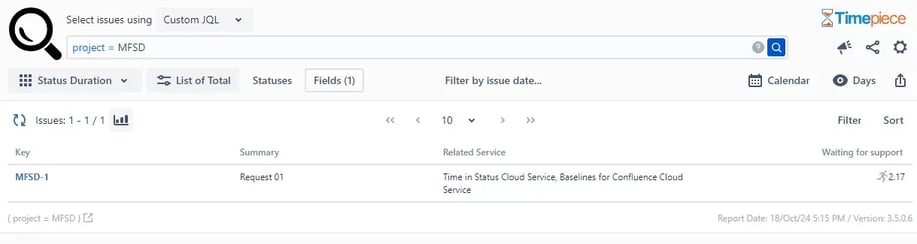
Support for Asset fields are available on Timepiece for Jira Cloud.
Formatted Time Estimate Fields
Jira issues have their own time estimation fields.
- Time Spent
- Σ Time Spent
- Original Estimate
- Σ Original Estimate
- Remaining Estimate
- Σ Remaining Estimate
The values of these fields are displayed in a format that is configured by Jira admins. Usually, they go for easy-to-read formats like “8h”, “1w2d3h”, etc.
These formats are easy to read but hard to make calculations with. Many customers reached us with their need to export these values to a spreadsheet and compare these field values with report values calculated by Timepiece. They always complained about the difficulty of handling these values in Excel.
With this week’s release, we are introducing 6 new calculated Timepiece fields.
- Time Spent (Formatted)
- Σ Time Spent (Formatted)
- Original Estimate (Formatted)
- Σ Original Estimate (Formatted)
- Remaining Estimate (Formatted)
- Σ Remaining Estimate (Formatted)
These fields will display the same value as their matching Jira system field counterparts but in the View Format selected for your Timepiece report. When simple View Formats such as Days, Hours, or Minutes, are selected, it will be possible to use them in spreadsheet calculations without a hassle.
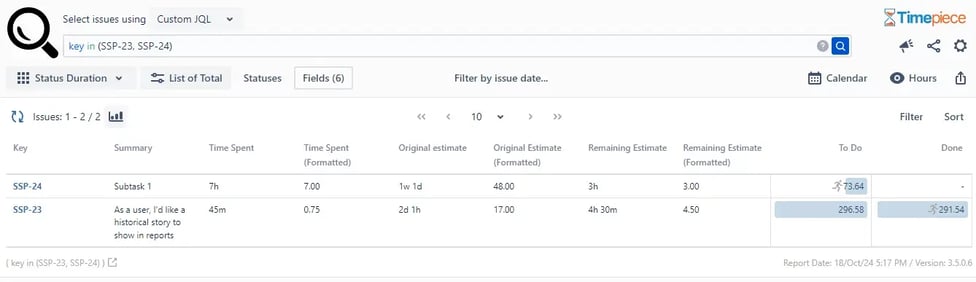
Formatted Time Estimation fields were available on Timepiece for Jira Cloud and was introduced to Timepiece for Jira Data Center starting with v5.3.0.
What is Atlassian Assets, and Why Report on It?
Atlassian Assets (previously called Insight) is Atlassian's built-in configuration management database, available on Jira Service Management Premium and Enterprise plans.
It lets teams track hardware, software licenses, and other configuration items, then link those objects directly to Jira issues. On its own, Assets tells you what's linked to a ticket. Paired with Timepiece, you can now see how that ticket performed over time.
Group your Time in Status reports by asset type, and you can answer questions like: which category of asset generates the most support tickets, or which one takes the longest to resolve. A team managing a hardware fleet could compare average resolution time for laptop tickets against monitor tickets, for example, without exporting anything by hand.
Conclusion
With the addition of Asset Objects and Formatted Time Estimate Fields to its calculated field arsenal, Timepiece – Time in Status for Jira is more powerful than ever. To get more information, you can visit its Atlassian Marketplace page.
To try Timepiece without installing, visit our live demo. Also, you can book a meeting with one of our experts.

Report Time Spent in Each Sprint with Timepiece for Jira

Track Time Metrics Natively with Timepiece Custom Field