By
Ayca Erdem
on 06/08/2024, 11:09
Last updated on 7/24/26, 6:26 PM

Timepiece – Time in Status for Jira now has improved support for the Sprint field in Any Field Duration reports, so you can report the time each issue spent in each sprint
Quick context: this is the second step in improving Timepiece's Sprint field support, following the recent addition of Sprint (Current) and Sprint (Latest) fields.
First, a quick reminder
As you know, a Jira issue can take part in multiple Sprints and Jira keeps the names of those Sprints in a custom field named Sprint. This field is a multi-value field and it keeps the names of all Sprints the issue was assigned to (if the issue was in the Sprint when the Sprint was completed). If the issue was removed earlier, the Sprint change stays in the issue history but its name is not kept in the Sprint field.
Conversely, if the issue was completed in the Sprint and it was still in the Sprint when the Sprint was completed, there will be no change in the issue’s history but the Sprint field will start displaying an empty value (it will show the sprint name as an old value when you click the plus sign).
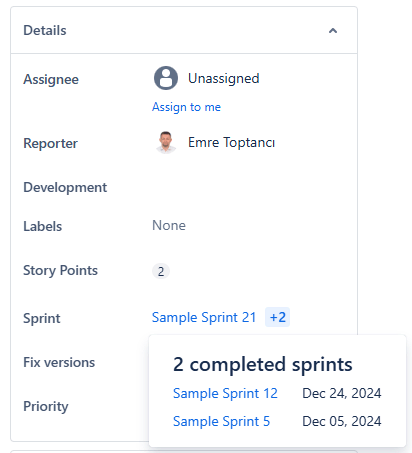
All of this complexity makes it very hard to see the time an issue has spent in each sprint (or the backlog). The usual workings of Any Field Duration report can’t handle these because of all the reasons explained above.
We built a fix for it.
How Timepiece Solves This
With this new solution, the Sprint field gets special treatment when selected as a History Field in an Any Field Duration report. For the Sprint field, Timepiece will make calculations considering both the issue history and the Sprint history of the system and create a report showing how much time each issue spent in each sprint or the backlog.
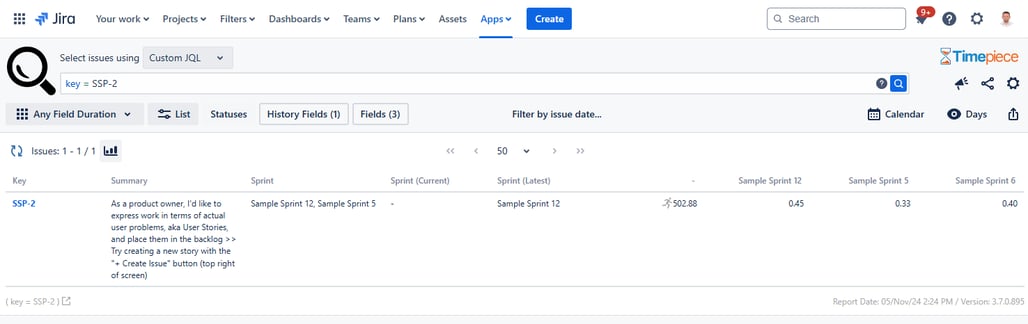
It doesn’t matter if the issue was created in the sprint, added after the sprint started, completed in the sprint, or removed before the sprint was completed. In all cases, Timepiece will show the time spent in each sprint.
How do I use it?
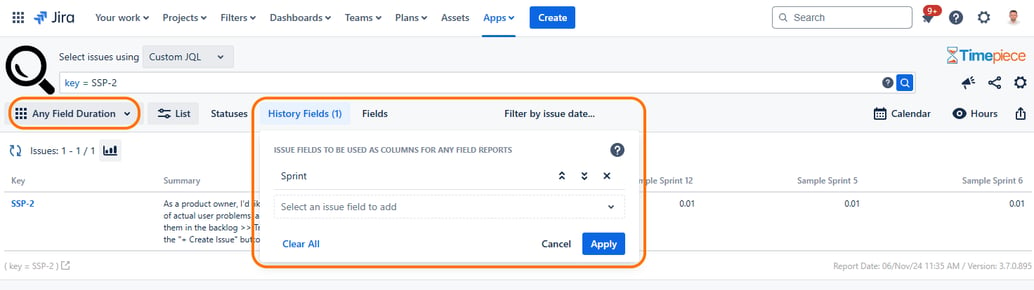
For the end user, the experience is exactly the same as any other Any Field Duration report. The user switches to Any Field Duration report and selects Sprint as the History Field. Timepiece will take care of the rest.
Conclusion
The improved accuracy of the Sprint field in Any Field Duration reports, combined with the new Sprint fields, gives you a lot more flexibility in Timepiece reporting.
To learn more about Timepiece – Time in Status for Jira, you can visit its Atlassian Marketplace page.

Track Atlassian Assets and Time Spent in Status with Timepiece

Identifying Issues Jumping from Sprint to Sprint with Timepiece – Time in Status for Jira