By
Emre Toptanci
on 06/08/2024, 11:09
Last updated on 7/24/26, 5:47 PM

Scrum Masters need more than ceremonies to catch Agile bottlenecks. Timepiece's sprint reports show you where work is actually getting stuck, in real time.
The Bottleneck Challenge in Sprints
In an ideal sprint, work moves smoothly from one stage to the next. In practice, it gets stuck, the hard part is finding out why. Timepiece's sprint reports are built to help pinpoint exactly that
Symptoms to look for
- Identify lingering issues: Issues staying in one status longer than expected usually signal a problem.
- Spot rework patterns: Frequent transitions between the same statuses often signal communication issues.
- Uncover planning flaws: If issues jump from sprint to sprint without resolution, it may indicate underestimation.
- Balance workloads: Issues piling up for one person point to a capacity problem.
With these reports, Scrum Masters can catch bottlenecks early and keep sprint goals on track.
Optimize with Timepiece Sprint Reports
An issue can sit in one status for all kinds of reasons, but it's always worth a look. However, it always indicates a workflow problem. Analyzing an Any Field Duration Report of Timepiece with Sprint and Status fields as History Fields helps identify delays. This report highlights stalled issues in one or more statuses (like In Progress, Test, and Code Review) within a sprint or across multiple sprints.
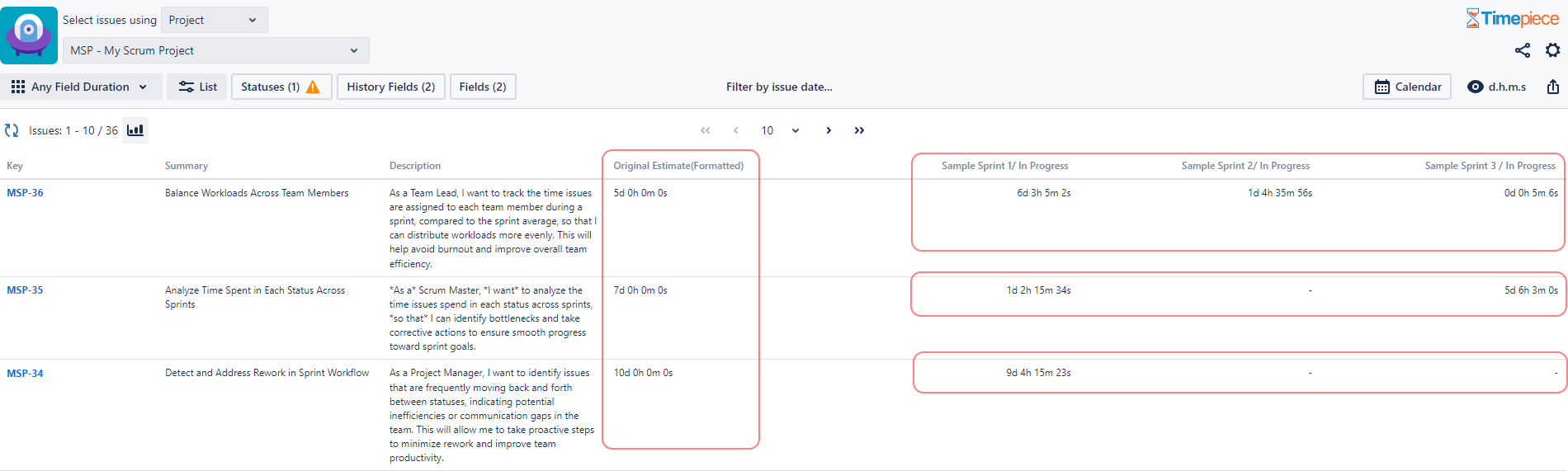
Analysis: The report highlights that MSP-36 exceeded its estimate by over a day, MSP-35 faced significant delays in Sprint 3, and MSP-34, though close to its estimate, required additional execution time for completion.
Tasks that repeatedly move between statuses without resolution
Work items that frequently shift between statuses often point to communication gaps. The Status Count Report of Timepiece helps track these repeating transitions. It displays how many times each issue moves to each status, making it easier to identify rework.
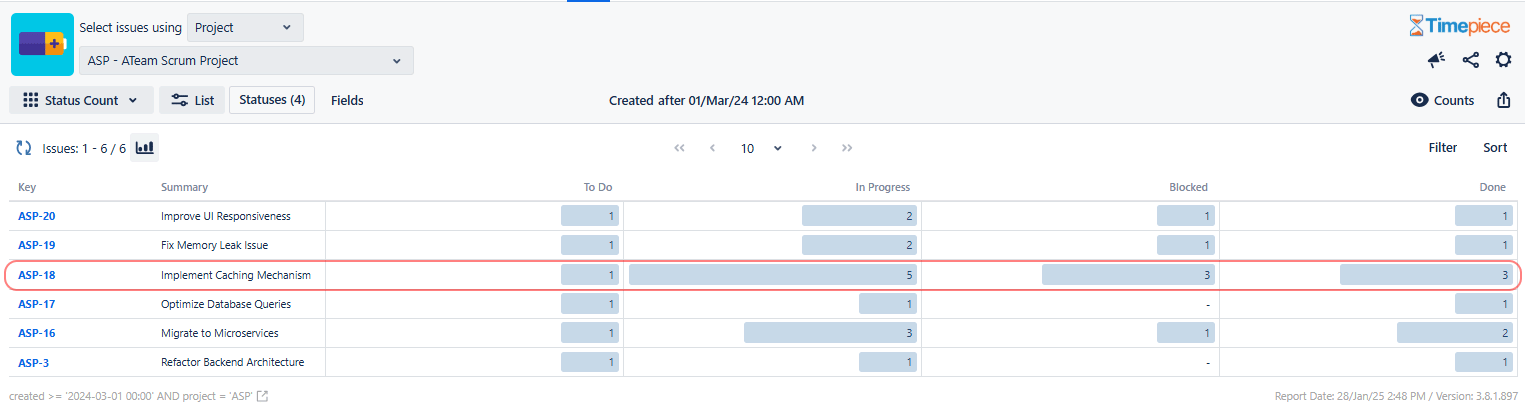
Analysis : The report shows that issue ASP-18 transitioned to In Progress five times, was Blocked three times, and moved to Done three times. These repeating transitions suggest a lack of clarity or unresolved blockers.
Issues jumping from sprint to sprint without being resolved
Tasks that carry over across multiple sprints indicate poor planning or underestimation. The Any Field Duration Report of Timepiece with Sprint field selected as the History Field helps track the time each issue spent in different sprints. By identifying these cases, teams can adjust estimates and improve backlog prioritization.
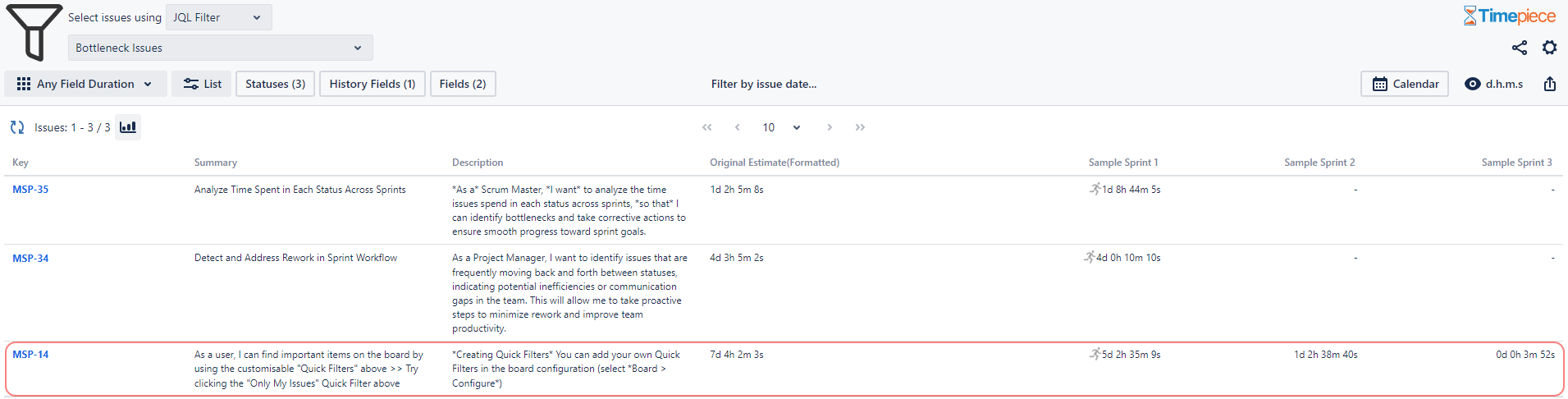
Analysis : The report indicates that MSP-14 had an original estimate of 5 days, but the total time spent on In Progress across sprints was 5d 4h. This minor underestimation, along with the fact that the issue moved across three different sprints, suggests that better sprint planning and task allocation could have improved its completion efficiency.
Team members are overwhelmed with work due to improper load balancing
Overloaded team members can slow down sprints. The Any Field Duration Report of Timepiece, using Sprint and Assignee fields as the History Fields, helps visualize workload imbalances.
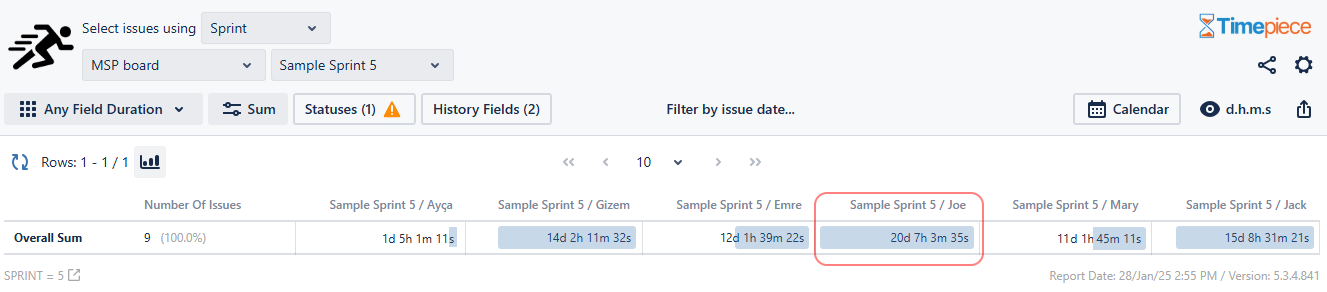
Analysis : In Sprint 5, each team member had a total capacity of 15 man-days. The data reveals that Joe’s assignee times exceeded 20 days, surpassing the sprint limit and the rest of the team’s capacity. This indicates tasks piled up before Joe. They should be reassigned to distribute work more efficiently.
Conclusion
Bottlenecks exist in every Agile process, but successful teams quickly identify and resolve them. Optimize Agile Workflows with Timepiece and get detailed workflow analysis, uncover inefficiencies, and support continuous improvement.
You can see Timepiece – Time in Status for Jira in action by starting a 30-day free trial today. Timepiece is even free on the Cloud for up to 10 users.

Find Workflow Delays with Timepiece – Time in Status for Jira

Identifying Issues Jumping from Sprint to Sprint with Timepiece – Time in Status for Jira