By
Birkan Yildiz
on 06/05/2026, 11:29
Last updated on 9/28/26, 10:56 PM

Optimizing a software development pipeline requires precise and empirical data. And Jira performance analytics bridges the gap between raw issue tracking and actionable process intelligence. Instead of guessing why a sprint fell behind, teams can track core agile metrics like Cycle Time, Throughput, and Lead Time to pinpoint the exact bottlenecks slowing them down.
The Core Framework of Agile Performance Metrics
What is Throughput in Jira?
Throughput in Jira measures your team's actual productivity. It counts the exact number of tickets completed in a set time period, like a sprint or a month. In a nutshell, Throughput gives you hard facts. Tracking Throughput over time helps managers see output trends. You can break down completed issues by year, month, week, or day to spot patterns. Apps like Timepiece - Time in Status for Jira make it easy to track this. You can group data by specific fields to calculate averages and sums over specific timeframes.
Cycle Time and Lead Time
Lead Time and Cycle Time indicate how quickly your team delivers work. Lead Time tracks the total time from the very first request until the work is live. This includes the time a ticket waits in the backlog. Customers care about Lead Time. It tells them when their request will be ready.
Cycle Time only measures active work. The clock starts when a team member begins working on the ticket. It stops when the work is done. A high Cycle Time usually means you have internal roadblocks. Timepiece’s Duration Between Statuses report lets you calculate both metrics right inside Jira. That means you pick the exact start and end statuses without changing your workflow.
Workload Distribution
You need to understand workload distribution to manage your team well. This metric helps you check team capacity and stop burnout before it happens. It measures how much active work each person handles over time. Timepiece’s Assignee Duration Report shows exactly how long work sits with specific people. It breaks down who worked on what and for how long. This helps managers find overloaded team members.
Rework and Transition Counts
Rework happens when a ticket moves backward in your workflow. Think of an issue going from the Review status back to the In Progress status. If this happens a lot, you likely have quality issues or communication problems between teams.
%20(1).png?width=1642&height=547&name=image-20251203-133843%20(3)%20(1).png)
Timepiece’s Transition Count report helps teams to measure how many times a ticket bounces between specific statuses. This helps you find the exact point where work fails.
|
Metric
|
Description | Timepiece Feature |
| Throughput | Counts the exact number of tickets completed in a set time period to measure productivity. | Time Period Reports |
| Cycle Time | Measures the time spent only on active work, from when a task is started to when it is done. | Duration Between Statuses (DBS) |
| Lead Time | Tracks the total time from the very first request until the work is completely delivered. | Duration Between Statuses (DBS) |
| Workload Distribution | Measures how much active work each person handles over time to check capacity and prevent burnout. | Assignee Duration Report |
| Rework and Transition Counts | Tracks how often a ticket moves backward in the workflow to diagnose quality issues or communication problems. | Transition Count Report |
The Structural and Architectural Limitations of Native Jira Reporting
The Complexity of Extracting Historical State Changes via API and Automation
Getting historical status data out of Jira is hard. It takes up valuable engineering time. Teams usually have to use the Jira REST API to download raw issue histories. Then, data engineers write custom code to calculate the time spent in each status and move that data to other tools.
Also, the Jira API hits rate limits fast. That is why some Jira admins try to use Jira Automation. They set rules to record a timestamp in a hidden field every time a status changes. Both of these options create technical debt and require constant upkeep.
The Ambiguity of the Native Control Chart
Jira has a native Control Chart to show Cycle Time. But users often find it hard to read. It turns complex workflows into a single number. This hides important details. The Control Chart calculates Cycle Time based on the statuses you select. If an issue is reopened and finished again, Jira just adds that extra time to the total. This mixes actual work time with rework. The Control Chart is not flexible enough for deep analysis. It cannot handle complex workflows well.
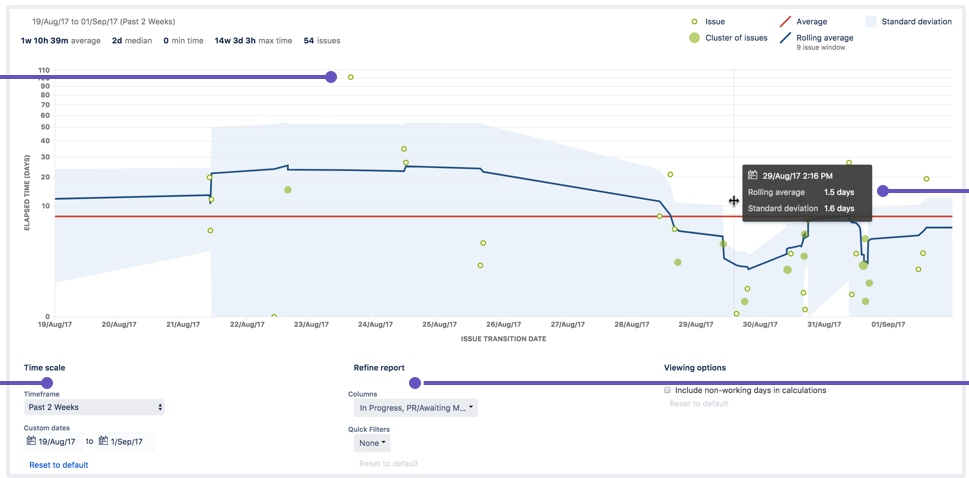
It also cannot easily subtract the time an issue spends in a blocked status. It provides a high-level overview but lacks the ability to drill down into problem areas to inspect individual issues.
The 24/7 Calendar Skew and the Weekend Paradox
Jira uses a 24/7 clock for its native reports. That means it counts every second. It ignores your business hours, and counting weekends, and holidays. This creates a big problem called the Weekend Paradox, and it makes your data highly inaccurate.
Jira Performance Analytics with Timepiece
Resolving Cross-Geographical Time Zone Discrepancies
Using one global calendar ruins data for teams spread across different time zones. Timepiece solves this with multi-calendar support. You can create separate calendars for different regions. A company can set one calendar for developers in Germany and another for testers in Japan. Each calendar uses local working hours and holidays. This keeps your reports accurate across all time zones without any manual math.
Status Counts: Identifying the Scale of Process Stagnation
Rework wastes a lot of time and effort. The Status Count report in Timepiece shows you how many times a ticket entered each status. If a bug ticket shows a count of four in the QA status, it means it failed testing and was sent back 4 times. This helps you spot the exact tasks that cause delays.
Transition Counts: The Diagnostic Ping-Pong Detector
To find exactly where your process breaks, you use the Transition Count Report. It counts the exact backward moves between specific statuses.
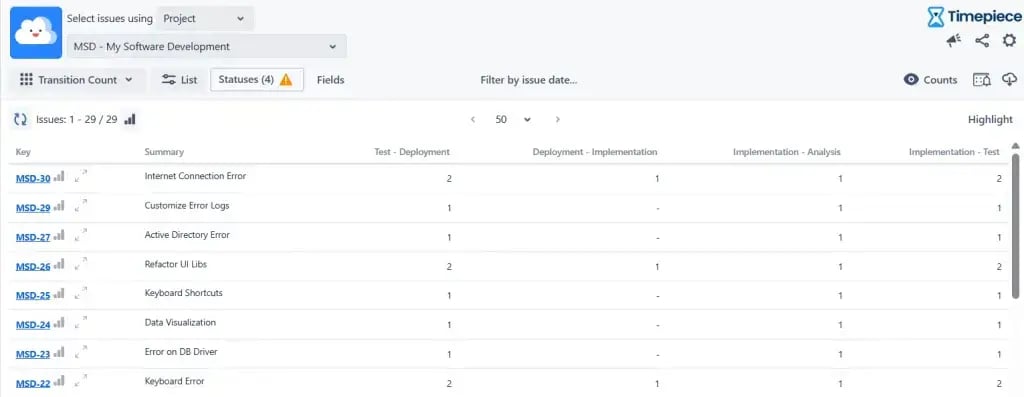
This helps managers find the exact handoff that causes problems. Status Count Report shows you the size of the problem. The Transition Count shows you the cause.
Tracking Sprint Jumpers and Unmanaged Dependencies
While 'Sprint Jumpers' might sound like a track and field event, in the agile world, it refers to tasks that continuously fail to reach completion and roll over into the next sprint. To effectively manage this, teams can use the Any Field Duration report of the Timepiece. By selecting 'Sprint' and 'Status' as your historical tracking fields, the report generates a precise breakdown of exactly how much time an issue spent in every status across individual sprints.
This visibility makes it effortless to identify tickets that consistently jump from sprint to sprint, acting as a clear indicator of poor estimation or unmanaged dependencies blocking your team's progress.
Custom Calendars Are Crucial
Timepiece fixes Jira's 24/7 clock issue with custom business calendars. Admins can tell the app to pause timers during nights, weekends, and holidays. This removes the dead time from your reports.
Block Reason Analysis via Custom Field Durations
Standard Jira reports do not handle “blocked time” well. They might show a ticket as active for two weeks, even if it spent six days waiting for a vendor. This inflates your Cycle Time and ruins your data.
%20(1).png?width=1611&height=623&name=image-20260302-104335%20(2)%20(1).png)
Agile teams use Timepiece to track custom fields like Block Reason. When an issue gets blocked, the developer updates a custom field with the reason. They might select waiting for the vendor or needing budget approval. Timepiece groups this data together. You can see exactly how much total time your team loses to each type of blocker.
Timepiece - Time in Status for Jira gives you the exact metrics you need for performance analytics. And it gives it to you without the technical headaches. Timepiece helps you track cycle time, spot rework loops, and balance your team's workload.
Learn more about Timepiece - Time in Status for Jira on the Atlassian Marketplace and start your 30-day free trial.
Check the official documentation page, or book a demo with one of our experts.

Find Workflow Delays with Timepiece – Time in Status for Jira

How to Deduct Flagged (Blocked) Time from Cycle Time and Lead Time in Jira