By
Gizem Gokce
on 06/08/2024, 11:09
Last updated on 6/12/26, 11:50 AM

TicketBook was originally built to help you track service contracts, manage quotas (like ticket counts, service hours, or SLA success rates), and run reports. But until now, that data only lived in the backend.
Contract managers could see the numbers, but the people actually using the quota, your customers and your support agents, couldn't.
We just fixed that. With this week’s update, TicketBook now displays live contract summaries directly on the Jira Service Management (JSM) Customer Portal and Jira Issue View pages.
Here is how the new panels work.
Show Customers Their Remaining Quota Before They Open a Ticket
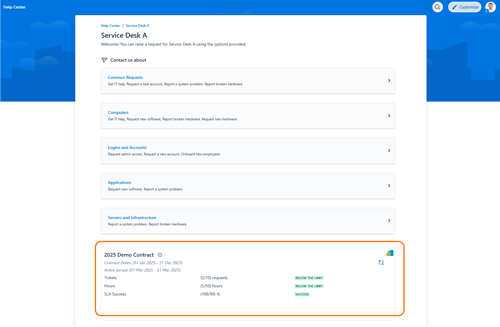
When a customer logs into your Help Center, they can now see a quick summary of their current contract period. Before they even type out a new request, they know exactly how many support hours or tickets they have left.
This prevents awkward conversations at the end of the month when a client accidentally goes over their limit. As an admin, you have full control over this panel. You decide which contracts are visible on the portal and which specific users are allowed to see them.
Give Agents the Right Context on the Issue View
Your agents shouldn't have to leave a ticket to look up a customer's contract details. Now, they don't have to.
We added a second panel directly to the Jira Issue View, built specifically for your support team. It shows the customer’s current usage, plus details about past and future contracts. You can even leave custom reminders for your agents tied to specific contracts. This way, whoever picks up the ticket knows exactly what level of service the customer pays for before they start working.
Just like the customer portal, you control the permissions. You decide which agents see this panel and on which issue types it appears.
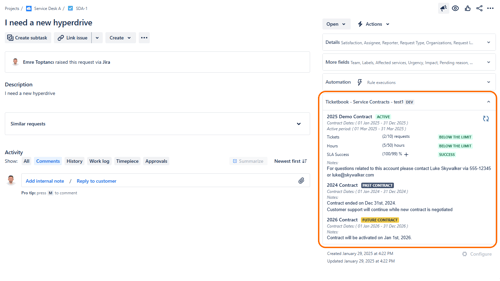
This panel shows the current period summary information of selected contracts. It also shows info about past and future contracts.
TicketBook started as a reporting tool for contract managers. With these new panels, it now keeps your customers and your support team on the exact same page.
Visit TicketBook's Atlassian Marketplace page to learn more. You can also book a demo.

Beyond Spreadsheets: Unifying Client Contract Management in Jira

How to Optimize SLA Reporting in Jira: Metrics, JQL, and Contracts