
By Gizem Gokce on 06/08/24 11:09
Last updated on 4/16/26 5:24 PM

This week’s release of the Jira Cloud edition of Time in Status introduces the “Apply Each Year” option for holiday definitions on calendars.
If you have holidays that repeat each year, you no longer have to define them separately for every year. You can define them once and say “Apply this holiday every year”.
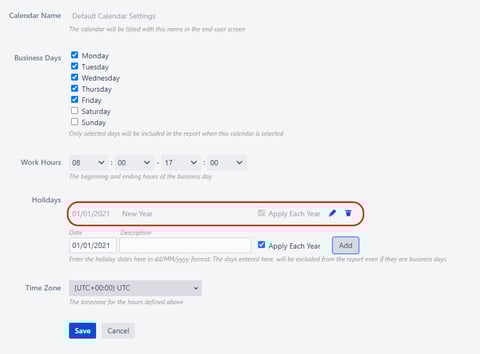
This is not a breaking change for existing calendars but the calendar admin page will force you to redefine holidays when you try to update a calendar with intersecting holidays.
As always, feel free to reach us through plugin@obss.com.tr or pluginsupport.obss.com.tr if you have any questions or suggestions.
Share this
Previous Articles
← Time in Status: How to measure in Jira?
Picking individual page versions for a baseline

Picking individual page versions for a baseline
06/08/24 11:09
1
min read
Single Request report data endpoints for Time in Status for Jira Cloud

Single Request report data endpoints for Time in Status for Jira Cloud
06/08/24 11:09
1
min read
Charts on Time in Status main report screen on Cloud

Charts on Time in Status main report screen on Cloud
06/08/24 11:09
1
min read
No Comments Yet
Let us know what you think